Introducing FontLab 9: stem editing, curved interpolation, optical oblique, neural spacing & kerning

- Upgrade your FontLab 8, 7, VI or Studio 5 to FontLab 9 for $149.
- Bought FontLab 8 after 1 January 2026? Upgrade to FontLab 9 for $49.
- Bought FontLab 8 after 1 June 2026? Upgrade for free!
- Buy FontLab 9 Lifetime for $499.
- Buy FontLab 9 Starter (129 days) for $139.
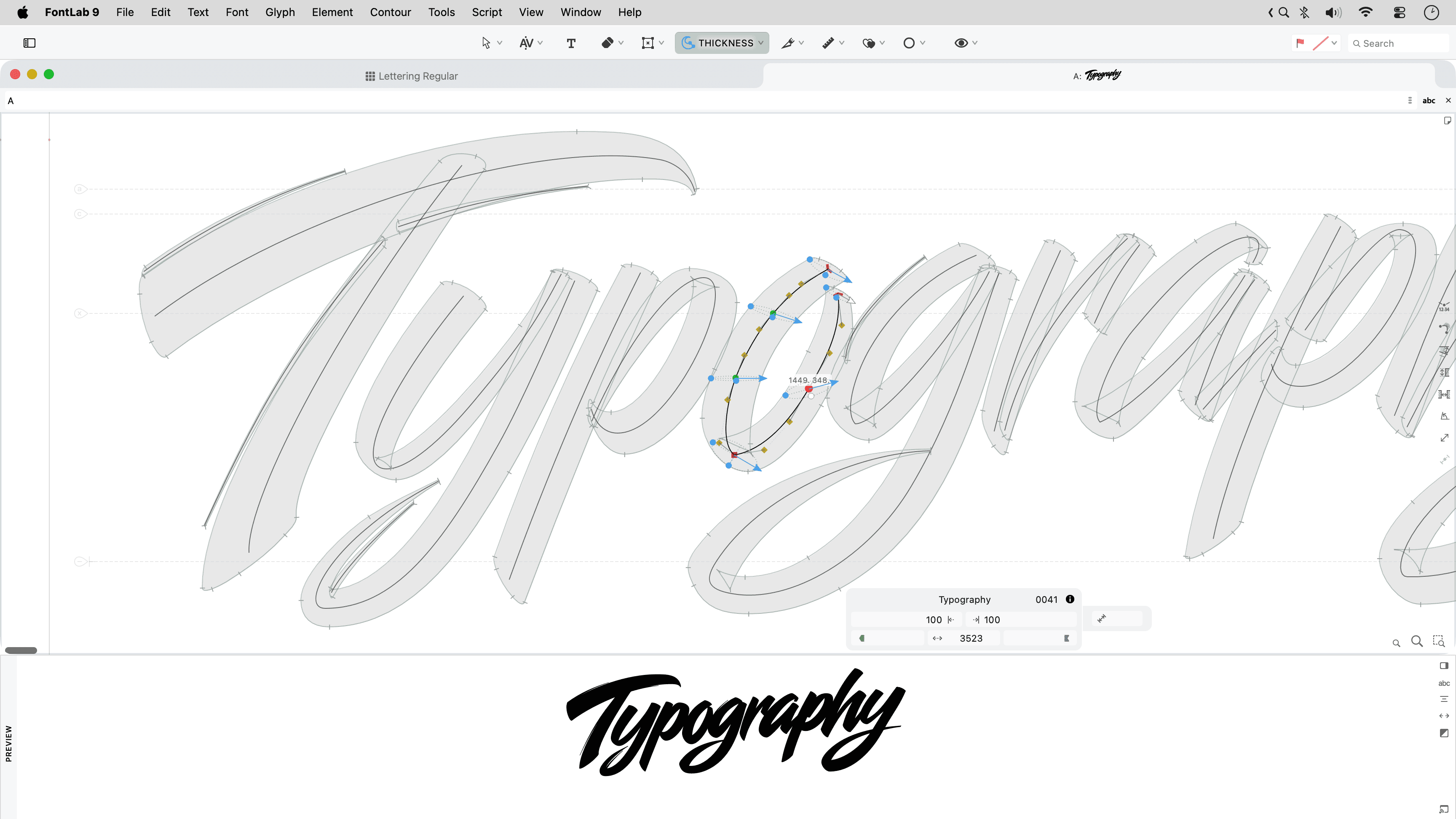
What’s new in FontLab 9
- Assisted automation: Ask Aidus, FontLab’s built-in assistant powered by a large language model of your choice, anything. Ask it about the app and the open font. Ask it to build Font window filters, to write simple Python scripts, to write proof texts, or to draft a missing glyph.
- Stems & thickness: Adjust the weight, width and slope of stems across one or several glyphs with the new Stem tool: visually, by units or by percentage. View Thickness consistency along curved and diagonal stems with Quick measurement rainbow.
- Drawing: Draw more confidently with the improved Pen tool: preview the next segment, draw corners, curves and tangents, or refine existing handles. Draw live calligraphic strokes with new Power Brush: use the Thickness tool to change the brush thickness, angle and roundness for every node. Add variation-compatible ink traps.
- Curve editing: Ensure perfect G2-smoothness with Genius Tangent nodes when a line segment transitions to curve, and on rounded Smart Corners. Simplify part of a contour with the new Trowel tool, or clear an area with the Cleaner tool. Turn bitmap images into contours more accurately with improved Autotrace.
- Workflow: Turn on Quick Preview on drag and focus on the shape whenenver you drag: all the distractions disappear. Turn all snapping on and off at once with Enable Snapping. Repeat the last command on a different glyph or layer with Repeat.
- Variation: Interpolate along curves with the Sigma tool. Switch construction partway along the axis with bracket layers. Slant glyphs with Make oblique action that performs automatic optical adjustment. Run Actions in a redesigned dialog with gorgeous large preview.
- Spacing & kerning: Kern existing and planned pairs in the new Superkerning panel. Use one set of kerning classes in all masters. Auto Space and Auto Kern with new neural algorithms. Preview multiple font sizes, masters, instances in the new Notepad panel; build and edit specimens, and export then to PDF.
- Assemble & reuse: Selectively copy-paste contours, appearance, metrics, anchors, guides, hints or masks across masters with Paste Special. Reuse Skin elements. Reshape elements with the Mesh filter. See which glyphs have contours, components or advanced elements with Color-code element type.
- Tech: Visually edit and test features for all writing systems in the Lookups editor, test with the step-by-step lookup debugger. Control ligature caret positioning with anchors. Export visual TrueType hints into static and variable fonts with the genuine VTT engine.
- Import & export: Open and export Glyphs 4 files. Import Open Font Format 2026 fonts with cubic TrueType outlines, variable components and “avar” version 2 mappings. Automate your work with improved Python scripting. Automate FontLab from external scripts and agents with the built-in MCP server.
- User interface: Use the interface and built-in help in 19 languages: English, Deutsch, Français, Español, Polski, Čeština, हिन्दी, Bahasa Indonesia, Italiano, 日本語, 한국어, Português, Русский, ไทย, Türkçe, Українська, Tiếng Việt, 简体中文, 繁體中文. Learn FontLab 9 from the all-new user manual. Simplify the user interface with Focused Menu. Enjoy better panel management, panel grouping, new tab management, redesigned preferences, and hundreds of improvements.
Discover FontLab 9 →
Comments
-
Congrats on the release! I’ve been playing with Aidus and just added a connector for Hellbox. You can ask it to create a proof from the font you’re working on, including unsaved edits, and it opens in Hellbox. As you keep working, saving in FontLab updates the same proof.
You can also Cmd-click a glyph in the proof to jump back to it in FontLab, or select some text and hit Return to send the whole string over. Pretty nice to be able to go back and forth like that.
I put together a setup guide with screenshots if anyone wants to try it. One limitation for now...variable VFJ sources proof the default master.
3 -
Excellent! We have a lot more improvements for scripting and automation coming to FontLab 9 very soon
 4
-
I really miss having a proper Shape Tool in FontLab 9, similar to the one in Adobe Illustrator. Features like Shape Builder and Boolean operations would make creating glyphs so much easier and more intuitive.I think this would be a fantastic addition to FontLab 9 and would greatly improve the workflow for designing typefaces!0
-
FontLab has Fill tool which is not exactly the same, but maybe even more flexible.There is also Fusion.4
-
Not sure how to correctly insert video here, but here is rough sample of Fill (and Stem) tools:4
-
Imagine you want to quickly construct a lowercase “g” using circles and lines. In Illustrator, this is easy to do by combining individual circles and lines with the Shape Builder Tool.Unfortunately, this approach doesn't work in the same way in FontLab, because circles are treated as filled shapes. The Fill Tool doesn't seem to handle this kind of construction; it works well with open contours, as demonstrated in your example with the “W”.I'd also recommend taking a look at Affinity's Shape Builder Tool. It's very intuitive and works well. You can combine, subtract or delete individual shapes with a simple click.0
-
Well, after all, a glyph is a filled shape
With the Fill tool, you can fill or un-fill any enclosed area, whether it’s formed by open or closed contours.
Click (or press-drag) to fill, Alt+click (or press-drag) to un-fill.
https://res.cloudinary.com/fontlab/video/upload/v1794147887/i/fl9/v/fill-2.mp4
2 -
Thank you, the video is very informative. FontLab 8 and 9 offer fantastic features that deserve to be showcased this way – especially from a marketing perspective. In today’s fast-paced world, engaging video tutorials are far more effective than hundreds of pages of documentation.
0 -
Hello @Adam Twardoch ,
First of all, congratulations on the release of FontLab 9! I'm really excited to explore this new version!
One thing I've noticed is that FontLab 9 marks some of my unencoded .sups and .subs glyphs with a red cell indicator, suggesting that they should have a Unicode value.
For example, j.sups is flagged because FontLab now expects U+02B2 (Modifier Letter Small J). However, I intentionally keep these glyphs unencoded, as they are only used as OpenType alternates.
The issue becomes problematic with glyphs such as o.sups or a.sups, as FontLab suggests Unicode values that are already assigned to other glyphs, such as U+00BA for ordmasculine. Trying to assign it triggers a warning asking whether I want to unencode ordmasculine.
Is there a way to prevent FontLab 9 from flagging these glyphs as Unicode mismatches while keeping their names and leaving them unencoded, as I have always done in previous versions?
Thanks in advance for your help, and congratulations again on the release!1 -
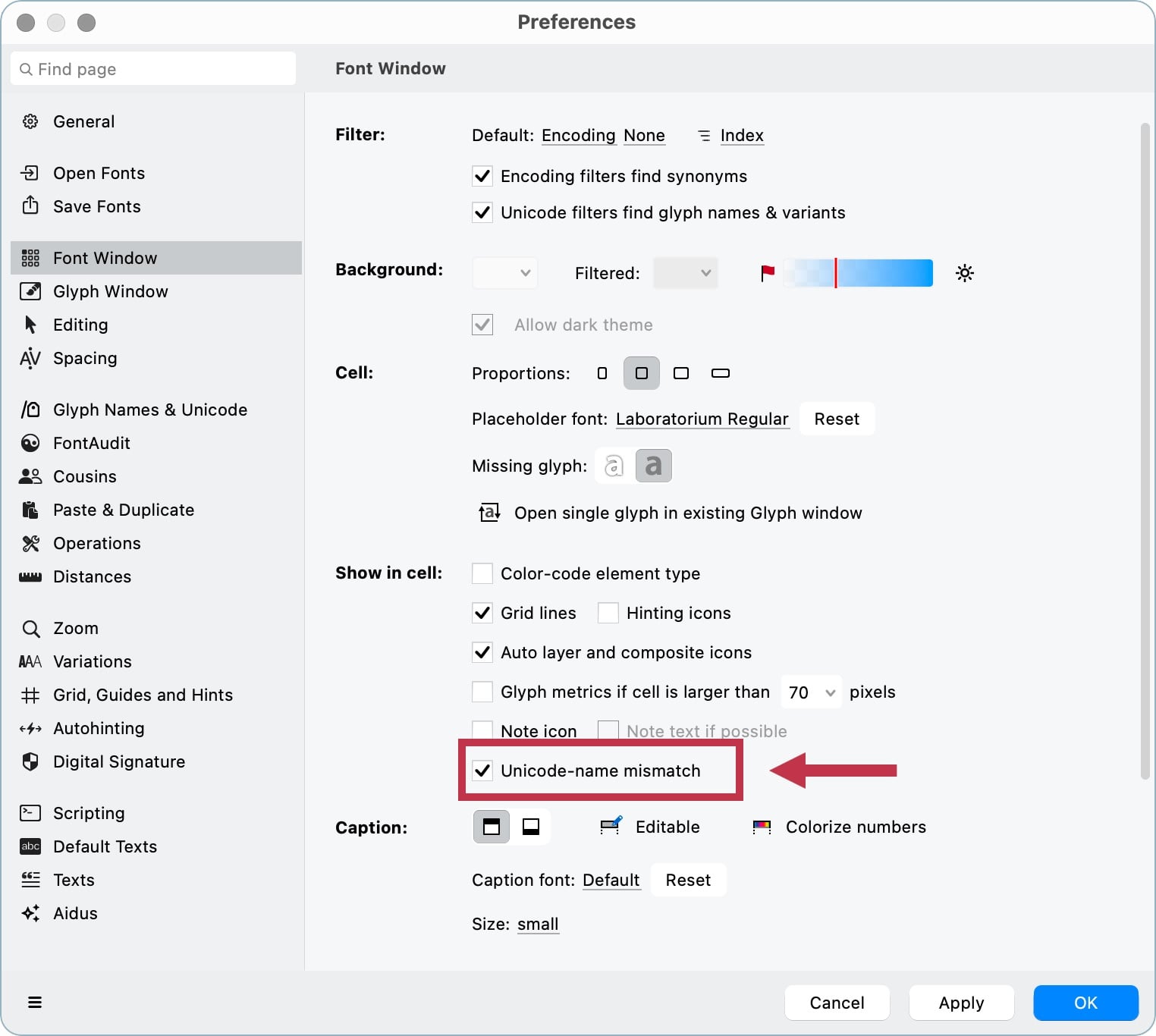
Hello David. In Preferences > Font Window, just disable this option:
0 -
Thanks @Igor Freiberger for the suggestion! Unchecking "Unicode name mismatch" does solve the red cell issue, but I see it more as a workaround than an ideal solution, as I would lose the ability to visually spot other genuine Unicode issues throughout the font.
Since this wasn't an issue in FontLab 8, I was wondering if there might be a more general solution to this, without having to compromise on the Unicode mismatch checks altogether.0 -
David, we'll look into this issue, thank you!
In the meantime, you can create your own version of the standard.nam file. Find the default file in Preferences by searching for "Unicode", then make a copy and remove any unnecessary name-to-Unicode mappings (
j.supsin your case, and similar entries).Finally, point Preferences to your modified version of the file.
1 -
You can also create multiple different .nam files and use project-specific ones if you don’t always want to use the same glyph names or approach to what is encoded or not. In preferences, you can point to the location of a custom .nam file.
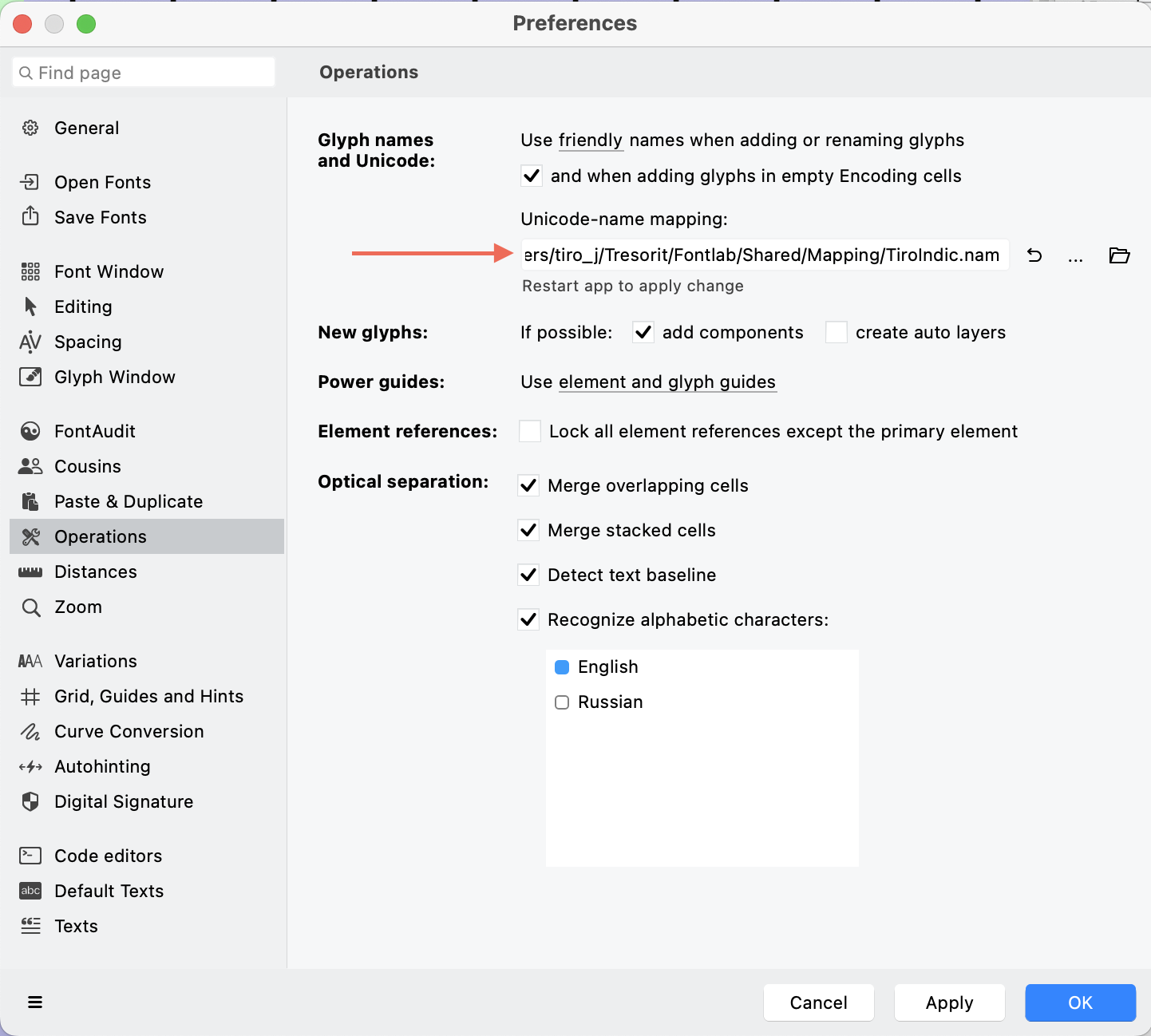 I find this useful because I am often working on projects for different clients with different preferences for how fonts are built, so having a single and universal standard.nam file isn’t practical.Unfortunately, only one .nam file can be active in FontLab at a time, and you have to restart the app to activate a change of .nam. I would really like if the .nam selection were source-specific, i.e. that it could be specified in font info for a project and that information saved in the VFC (if not found, if the .nam location changes or the VFC is opened by someone without the .nam, then an alert could pop up and FL revert to standard.nam).
0 -
Good point! Added to the list
We will probably change format for the default .nam file to .json, but older .nam files will always be supported.0 -
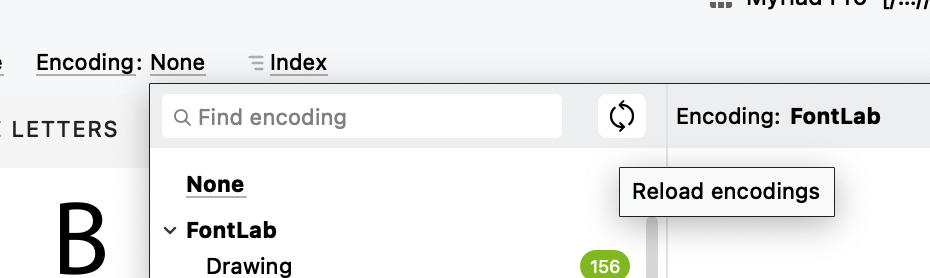
It would also be nice if it were possible to refresh .enc content without needing to restart FontLab, e.g. just by switching to a different encoding and back. Sometimes, I add a glyph to a .enc while working, and it would be nice if FontLab could pick up that change more smoothly, without needing a restart.0
-
In FL9 you can refresh .enc files, there is new button in encodings popup:
 tehre4
-
In FL Studio 5, you could choose to either assign names to glyphs or assign unicode values to glyphs, and it would give you a menu of all available .nam files that you had installed in your Fontlab folder. No need to go into preferences and restart the app. I really wish newer versions of FL would restore this functionality since it was extremely useful.0
-
This is implemented and after some testing will be available in upcoming 9.1 release.John Hudson said:Unfortunately, only one .nam file can be active in FontLab at a time, and you have to restart the app to activate a change of .nam. I would really like if the .nam selection were source-specific, i.e. that it could be specified in font info for a project and that information saved in the VFC (if not found, if the .nam location changes or the VFC is opened by someone without the .nam, then an alert could pop up and FL revert to standard.nam).1






Categories
- All Categories
- 47 Introductions
- 4K Typeface Design
- 505 Type Design Critiques
- 597 Type Design Software
- 1.1K Type Design Technique & Theory
- 679 Type Business
- 911 Font Technology
- 29 Punchcutting
- 544 Typography
- 129 Type Education
- 333 Type History
- 82 Type Resources
- 114 Lettering and Calligraphy
- 33 Lettering Critiques
- 81 Lettering Technique & Theory
- 588 Announcements
- 102 Events
- 118 Job Postings
- 179 Type Releases
- 188 Miscellaneous News
- 270 About TypeDrawers
- 54 TypeDrawers Announcements
- 114 Suggestions and Bug Reports