Introducing FontLab 9: stem editing, curved interpolation, optical oblique, neural spacing & kerning

Adam Twardoch
Posts: 525
- Upgrade your FontLab 8, 7, VI or Studio 5 to FontLab 9 for $149.
- Bought FontLab 8 after 1 January 2026? Upgrade to FontLab 9 for $49.
- Bought FontLab 8 after 1 June 2026? Upgrade for free!
- Buy FontLab 9 Lifetime for $499.
- Buy FontLab 9 Starter (129 days) for $139.
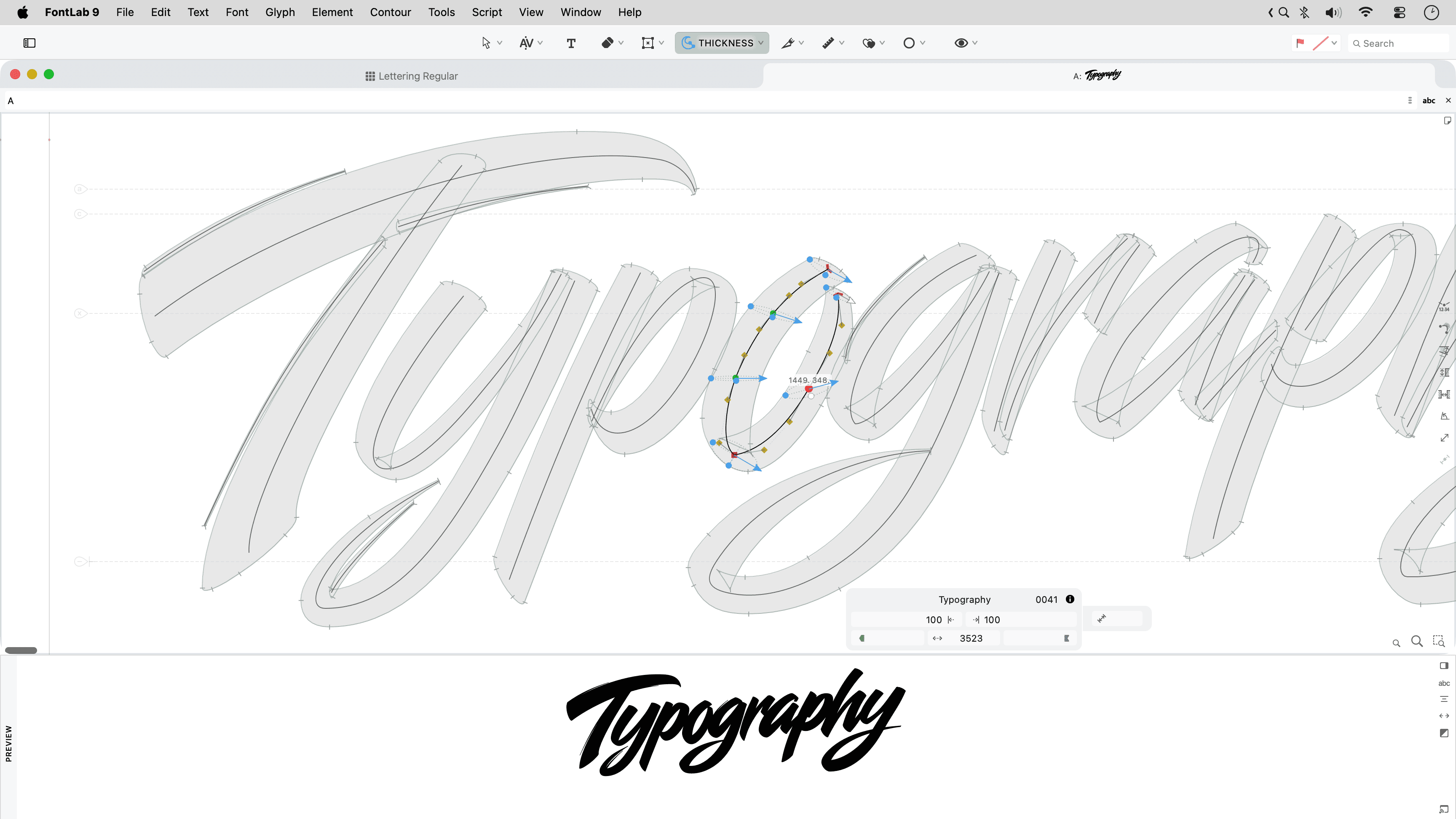
What’s new in FontLab 9
- Assisted automation: Ask Aidus, FontLab’s built-in assistant powered by a large language model of your choice, anything. Ask it about the app and the open font. Ask it to build Font window filters, to write simple Python scripts, to write proof texts, or to draft a missing glyph.
- Stems & thickness: Adjust the weight, width and slope of stems across one or several glyphs with the new Stem tool: visually, by units or by percentage. View Thickness consistency along curved and diagonal stems with Quick measurement rainbow.
- Drawing: Draw more confidently with the improved Pen tool: preview the next segment, draw corners, curves and tangents, or refine existing handles. Draw live calligraphic strokes with new Power Brush: use the Thickness tool to change the brush thickness, angle and roundness for every node. Add variation-compatible ink traps.
- Curve editing: Ensure perfect G2-smoothness with Genius Tangent nodes when a line segment transitions to curve, and on rounded Smart Corners. Simplify part of a contour with the new Trowel tool, or clear an area with the Cleaner tool. Turn bitmap images into contours more accurately with improved Autotrace.
- Workflow: Turn on Quick Preview on drag and focus on the shape whenenver you drag: all the distractions disappear. Turn all snapping on and off at once with Enable Snapping. Repeat the last command on a different glyph or layer with Repeat.
- Variation: Interpolate along curves with the Sigma tool. Switch construction partway along the axis with bracket layers. Slant glyphs with Make oblique action that performs automatic optical adjustment. Run Actions in a redesigned dialog with gorgeous large preview.
- Spacing & kerning: Kern existing and planned pairs in the new Superkerning panel. Use one set of kerning classes in all masters. Auto Space and Auto Kern with new neural algorithms. Preview multiple font sizes, masters, instances in the new Notepad panel; build and edit specimens, and export then to PDF.
- Assemble & reuse: Selectively copy-paste contours, appearance, metrics, anchors, guides, hints or masks across masters with Paste Special. Reuse Skin elements. Reshape elements with the Mesh filter. See which glyphs have contours, components or advanced elements with Color-code element type.
- Tech: Visually edit and test features for all writing systems in the Lookups editor, test with the step-by-step lookup debugger. Control ligature caret positioning with anchors. Export visual TrueType hints into static and variable fonts with the genuine VTT engine.
- Import & export: Open and export Glyphs 4 files. Import Open Font Format 2026 fonts with cubic TrueType outlines, variable components and “avar” version 2 mappings. Automate your work with improved Python scripting. Automate FontLab from external scripts and agents with the built-in MCP server.
- User interface: Use the interface and built-in help in 19 languages: English, Deutsch, Français, Español, Polski, Čeština, हिन्दी, Bahasa Indonesia, Italiano, 日本語, 한국어, Português, Русский, ไทย, Türkçe, Українська, Tiếng Việt, 简体中文, 繁體中文. Learn FontLab 9 from the all-new user manual. Simplify the user interface with Focused Menu. Enjoy better panel management, panel grouping, new tab management, redesigned preferences, and hundreds of improvements.
Discover FontLab 9 →
Tagged:
7
Categories
- All Categories
- 47 Introductions
- 4K Typeface Design
- 505 Type Design Critiques
- 596 Type Design Software
- 1.1K Type Design Technique & Theory
- 676 Type Business
- 911 Font Technology
- 29 Punchcutting
- 544 Typography
- 129 Type Education
- 333 Type History
- 82 Type Resources
- 114 Lettering and Calligraphy
- 33 Lettering Critiques
- 81 Lettering Technique & Theory
- 587 Announcements
- 101 Events
- 118 Job Postings
- 179 Type Releases
- 188 Miscellaneous News
- 270 About TypeDrawers
- 54 TypeDrawers Announcements
- 114 Suggestions and Bug Reports