Autokerner: free spacing and kerning for FontLab 8, all masters in one run

Hi all,
I'd like to share Autokerner, a free, open-source (MIT) script for FontLab 8. It sets the sidebearings, the word space and the kerning (classes plus exception pairs) of a whole font, on every master at once, with one set of kerning classes shared by all masters, as a variable font needs. Nothing is written until you have seen the result and pressed Apply. After writing, the script reads the font back and checks it against the calculation, and Revert undoes the write.
The same calculation also runs in the browser for static TTF, OTF, WOFF and WOFF2 files; more on that below.
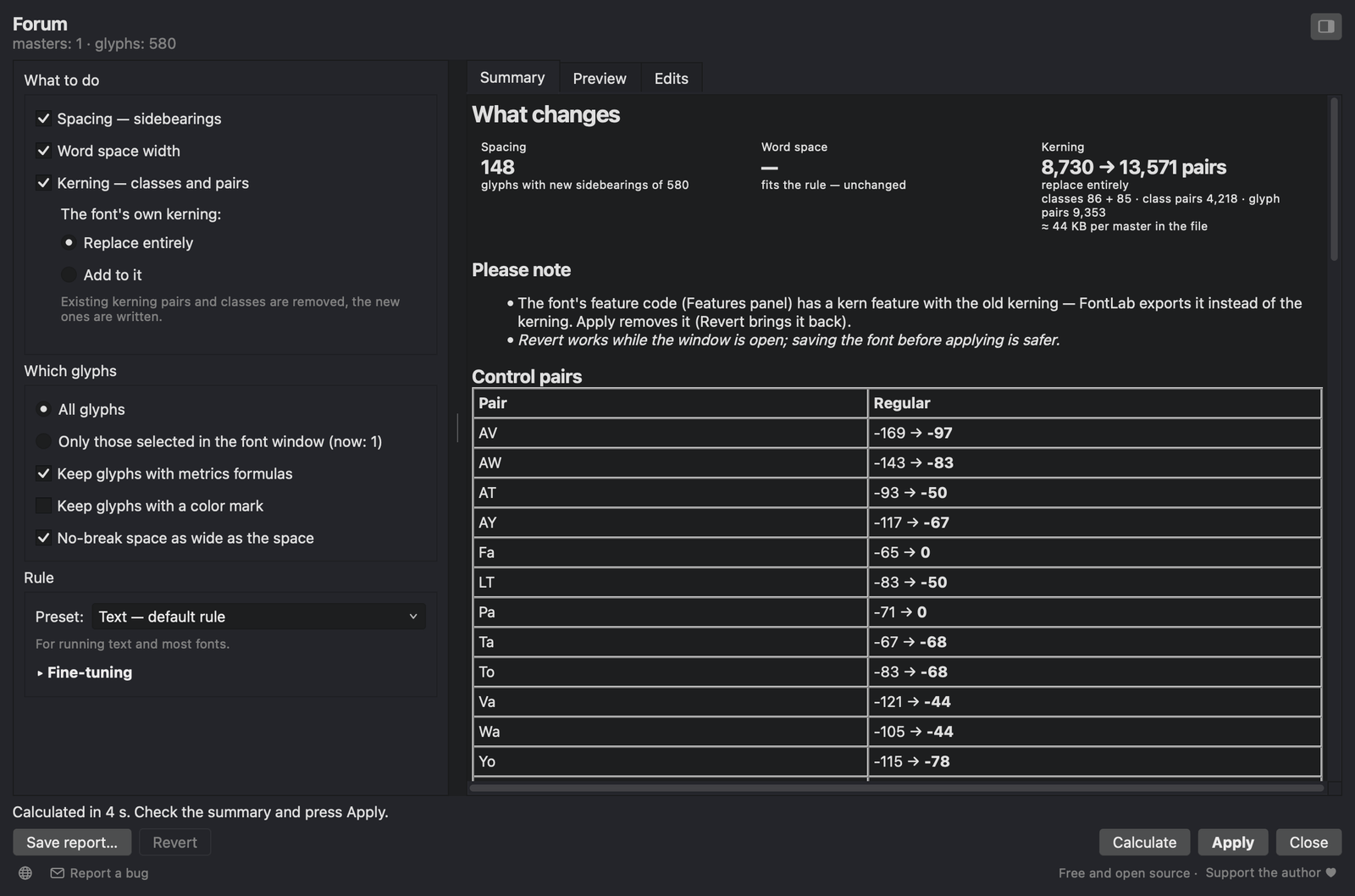
The window next to the font: settings on the left, results on the right. Forum Regular, 580 glyphs, calculated in 4 seconds.
What it does
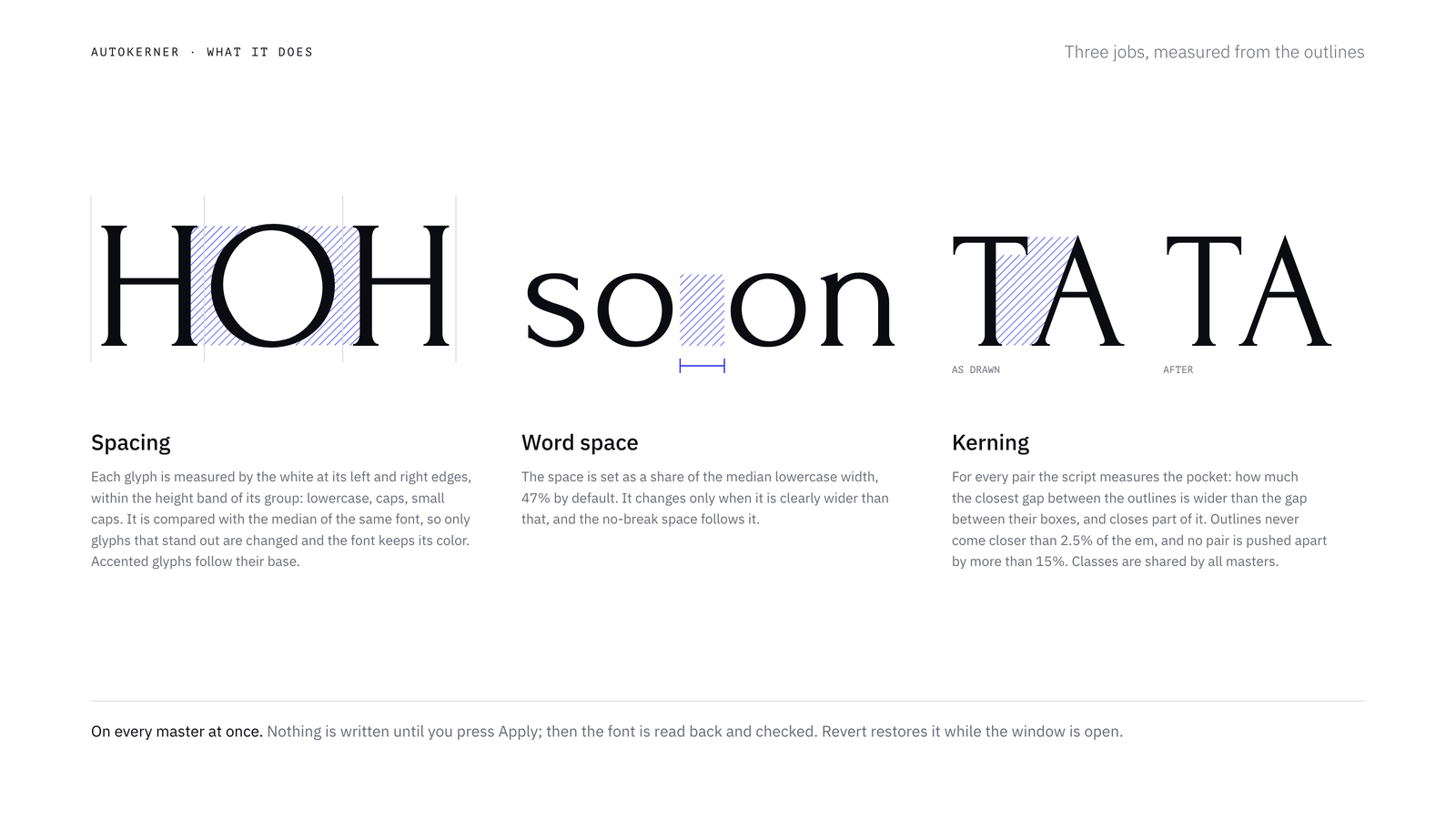
Spacing. Each glyph is measured by the area of white at its left and right edges, within the height band of its group (lowercase, caps, small caps), with the depth of the counted white limited to 7% of the em. This is the area method known from HT Letterspacer. The result is compared with the median of the same font, so only glyphs that stand out from their own family are changed (by default, when a sidebearing is off by more than 12/1000 em), and the font keeps its overall color. Accented letters follow their base letter, composites move with their base, and punctuation is spaced against the stem of a straight letter.
Word space. The target is 47% of the median lowercase width. A space that is much wider than that is narrowed to the edge of the tolerance (or, if you choose, all the way to the target), and the no-break space follows it.
Kerning. For every pair the script measures the pocket: how much wider the closest gap between the two outlines (including the shadow of overhangs) is than the gap between their bounding boxes. A share of the pocket is closed: 45% for letters, 40% for low punctuation (period, comma), 48% for high marks (quotes) and 32% for middle ones (hyphen, dashes). The Strength setting scales all of them. Pockets no deeper than the font's usual one (the median of model pairs such as HO and no) are left alone. Outlines never come closer than 2.5% of the em, and no pair is pushed apart by more than 15% of the em.
A few cases are handled separately. Figures never run into each other across , . : (7,4 · 3.5 · 12:30). A quote and a comma are not moved under each other. Combining marks, spacing accents and the underscore are not kerned, since they never stand next to letters in text.
All n × n pairs are measured on every master. The pairs are then grouped into classes by their values (one set of classes for all masters, values per master, class precision 10/1000 em), and pairs that don't fit their class are written by name, up to 12,000 by default.
The rules are ported to Python from another program of mine. With the window's corrections switched off, the results match it to the unit on the test fonts, including a variable font with nine masters.
How to use it
- Put
Autokerner.pyinto the FontLab 8 scripts folder (macOS:~/Library/Application Support/FontLab/FontLab 8/Scripts, Windows:%APPDATA%\FontLab\FontLab 8\Scripts) and choose Scripts → Refresh Scripts. - Open a font and choose Scripts → Autokerner. The window floats next to the font like FontLab's own panels, so you can select glyphs in the font window and calculate again.
- Tick what to do and which glyphs, pick a preset and press Calculate.
- Check the Summary, Preview and Edits tabs, and untick anything you don't want.
- Press Apply. Revert undoes the write while the window is open.
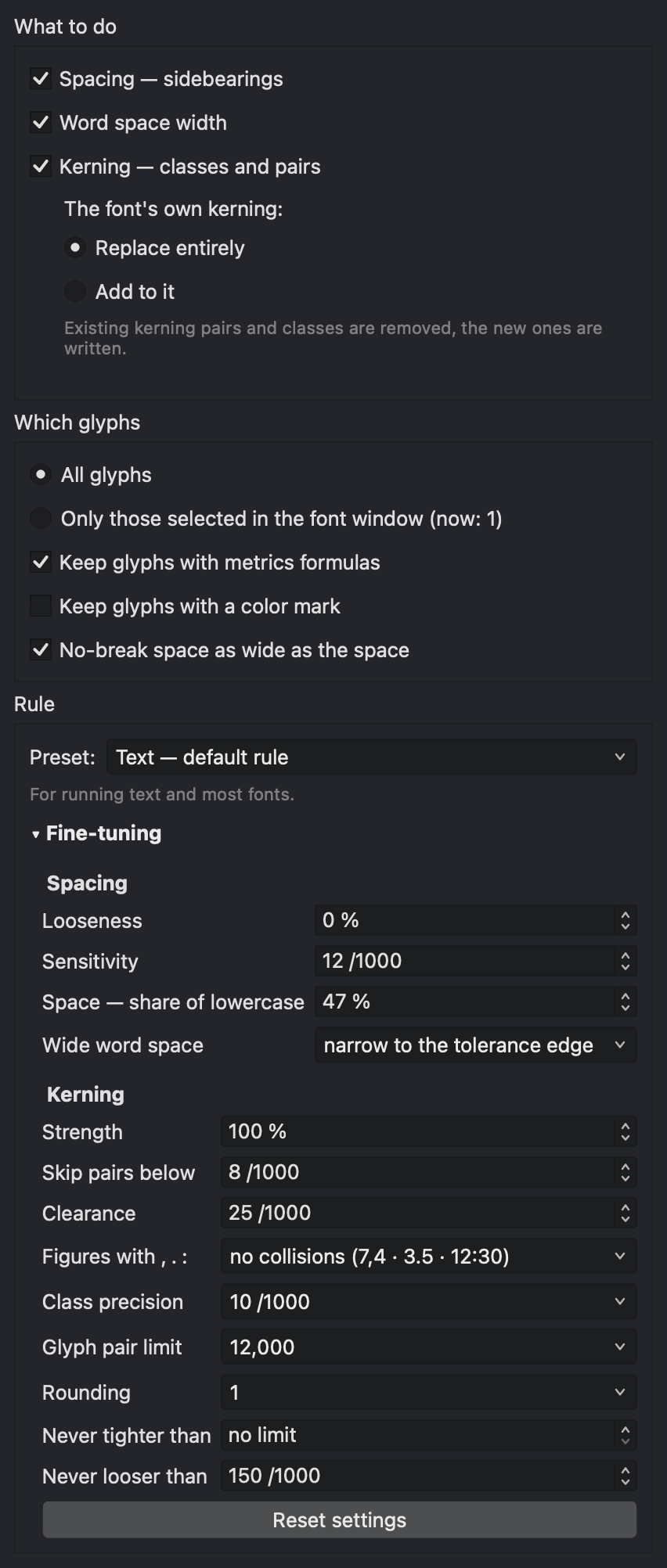
The left column with Fine-tuning unfolded.
- What to do: spacing, word space, kerning. Kerning can replace the font's own kerning or add to it: your pairs and classes stay, and only the pairs you don't have are added, as glyph pairs.
- Which glyphs: all, or only those selected in the font window. Glyphs with metrics formulas (
=H) or a color mark can be kept as they are. The no-break space can follow the word space. - Masters (multi-master fonts): which masters to calculate and write.
- Rule: three presets. Text is the default. Display sets spacing −8%, kerning strength 120%, clearance 15, threshold 5, finer classes and no pair limit. Light kerning sets strength 80%, threshold 15, class precision 20, values in steps of 5 and up to 3,000 glyph pairs, for small web fonts. Under Fine-tuning you can set looseness, sensitivity, the word space share and how far a too wide space is narrowed; for kerning, strength, threshold, clearance, figures with
, . :, class precision, the glyph pair limit, rounding, and the strongest and loosest allowed pair.
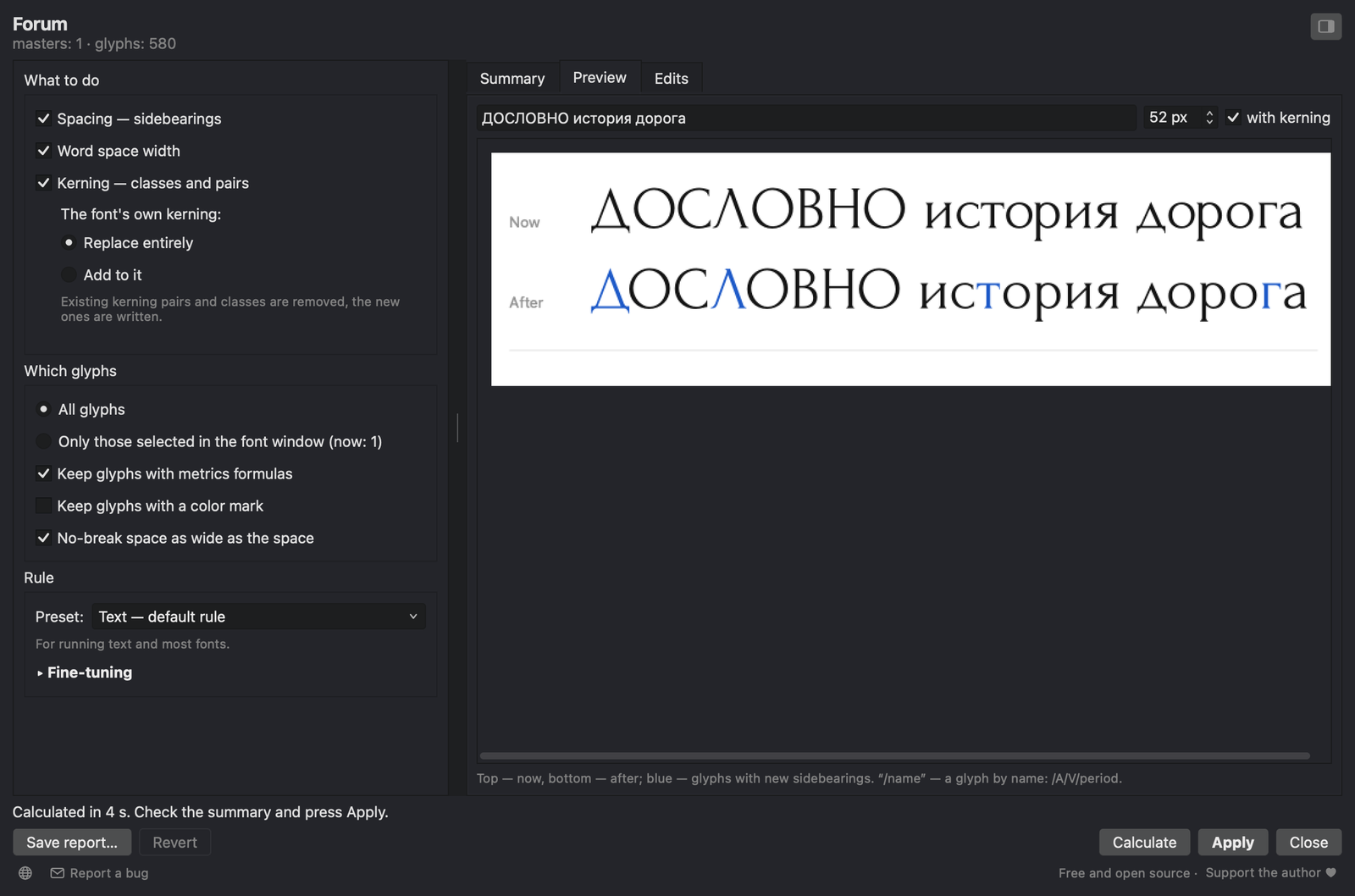
Preview: your own text set with the font as it is (top) and after Apply (bottom). Glyphs with new sidebearings are blue. /name inserts a glyph by name.
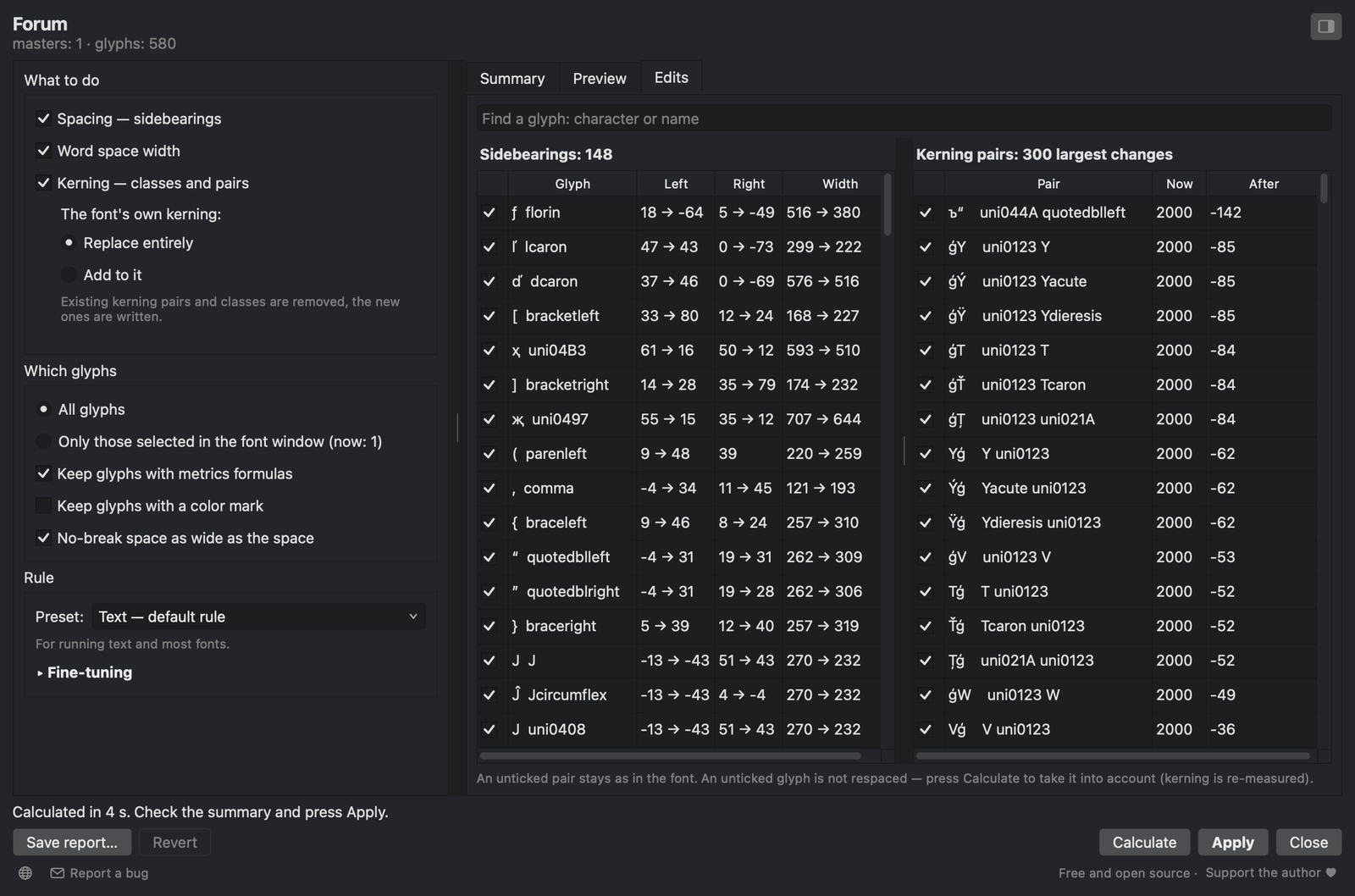
Edits: every respaced glyph and the 300 largest kerning changes. Searching by character or glyph name lists all pairs of a glyph. An unticked glyph is not respaced; an unticked pair stays as it is in the font. The top of the list here is a flaw in Forum itself: 54 broken pairs of 32,767 units in its GPOS, which FontLab reads as 2,000. The run replaces them.
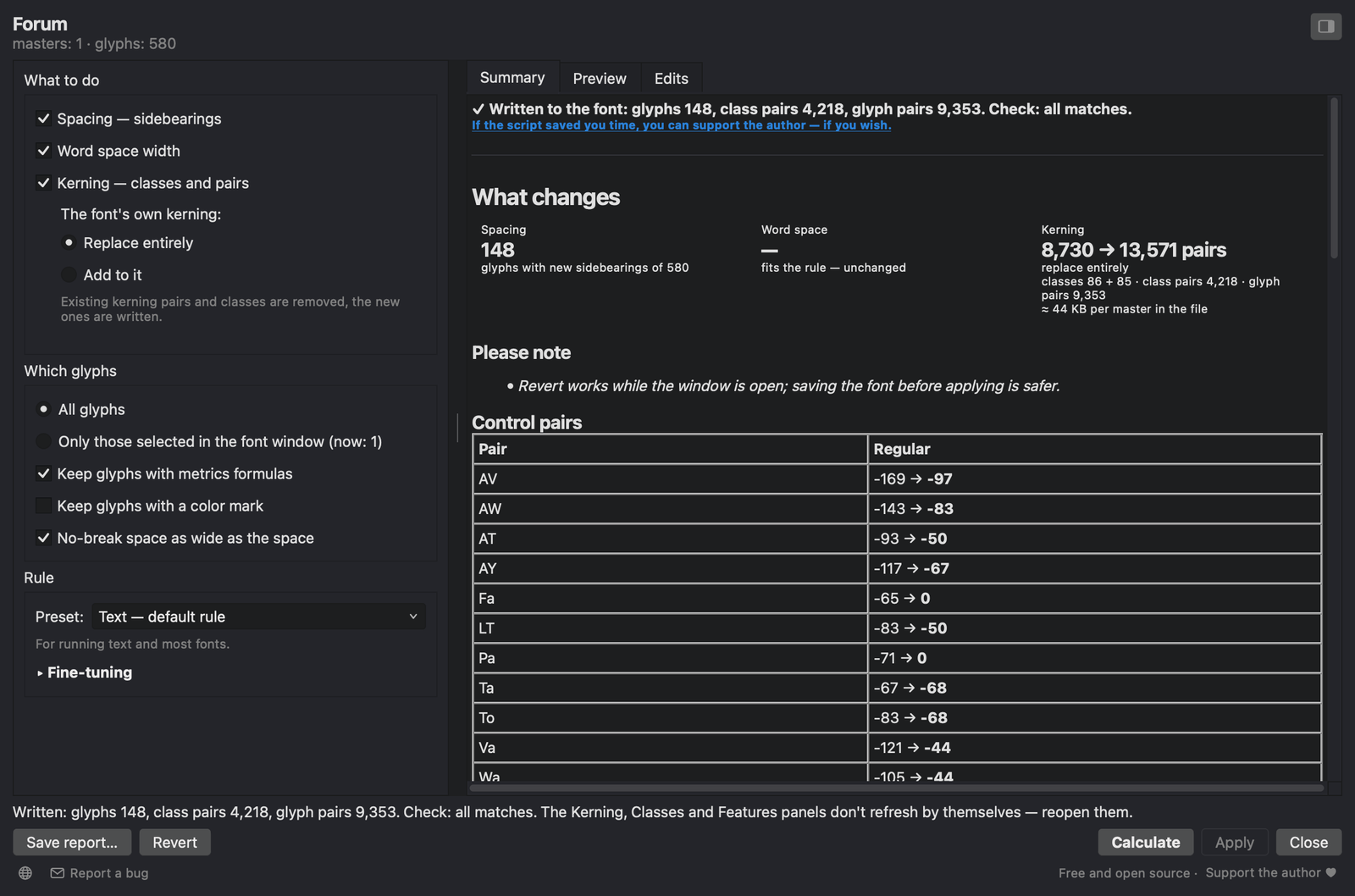
After Apply the font is read back and compared with the calculation. The status line says what was written and whether everything matches.
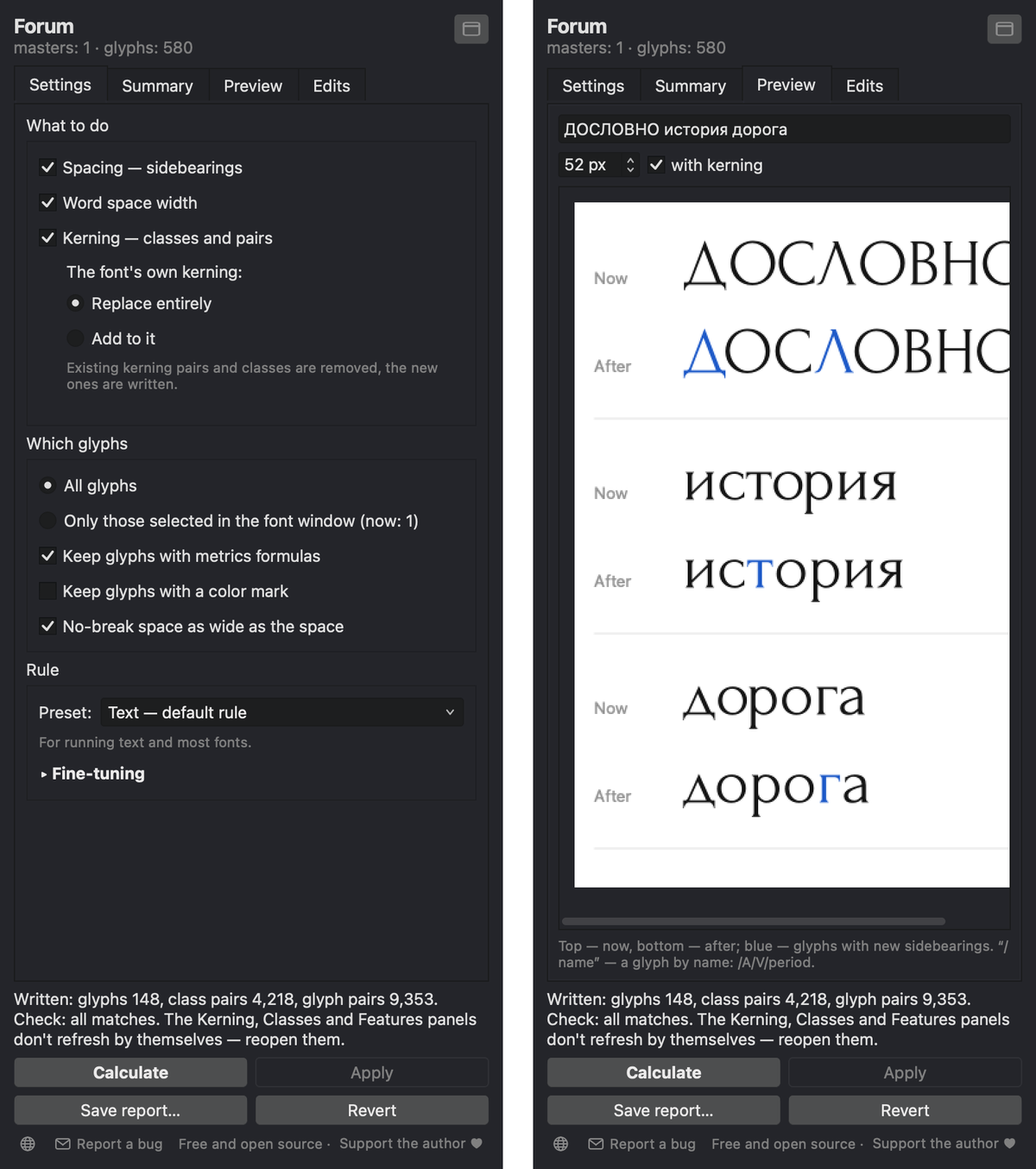
The same window as a narrow full-height panel. Switch with the button in the corner, or drag the window to the edge of the font window or a panel column, where it snaps.
Save report… writes an HTML summary, the sidebearing changes as CSV and the kerning of every master as .fea.
Results on real fonts
To show what a run does, I measured the white between letters before and after, and compared each pair with how widely used typefaces set the same pair: the median of ten typefaces for Latin, and of the four of them that have Cyrillic for Cyrillic. This check is independent of the script. Autokerner itself only compares a font with its own median.
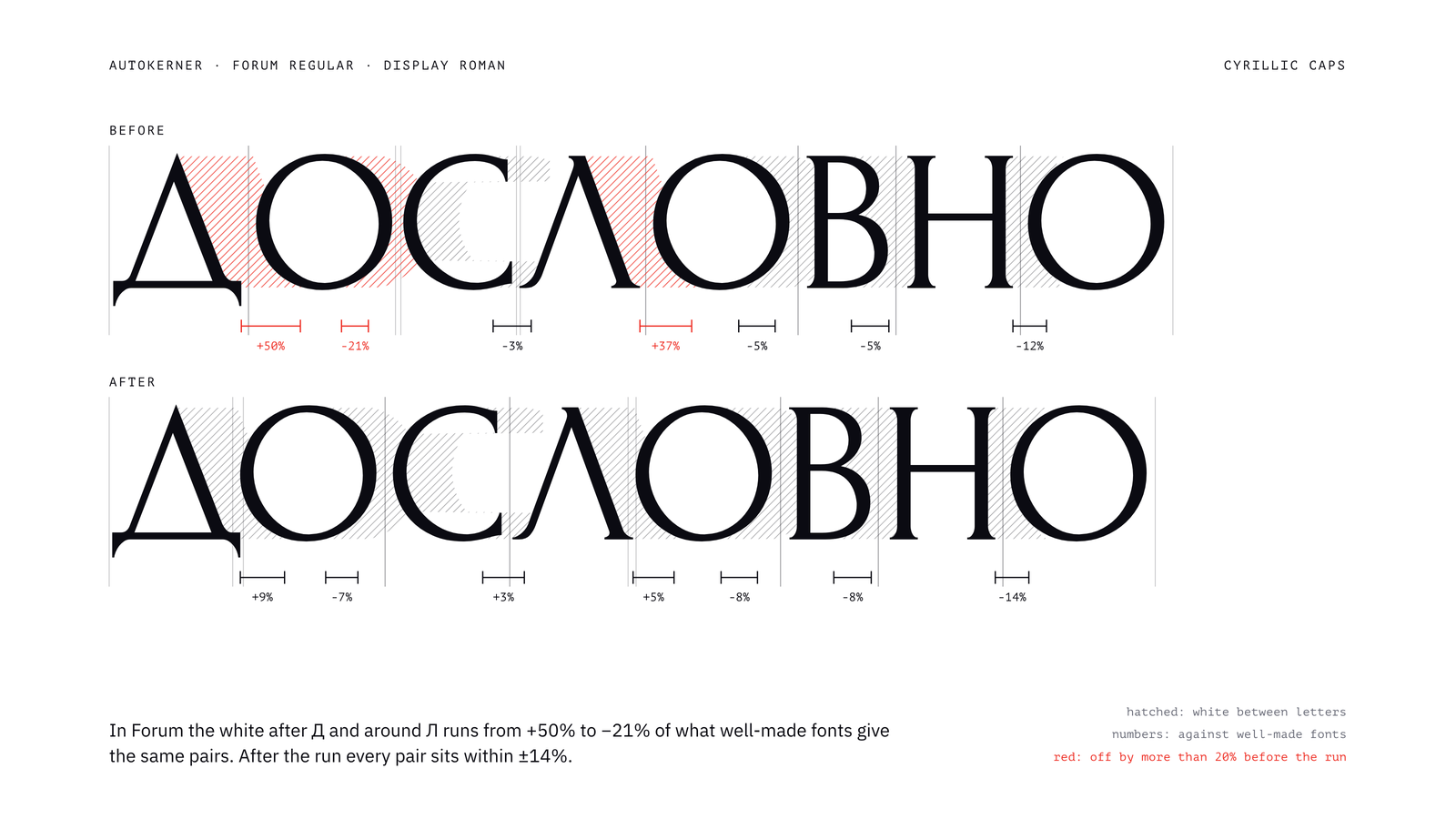
Forum, Cyrillic caps. Before, the white after Д and around Л ranges from +50% to −21%; after, every pair is within ±14%.
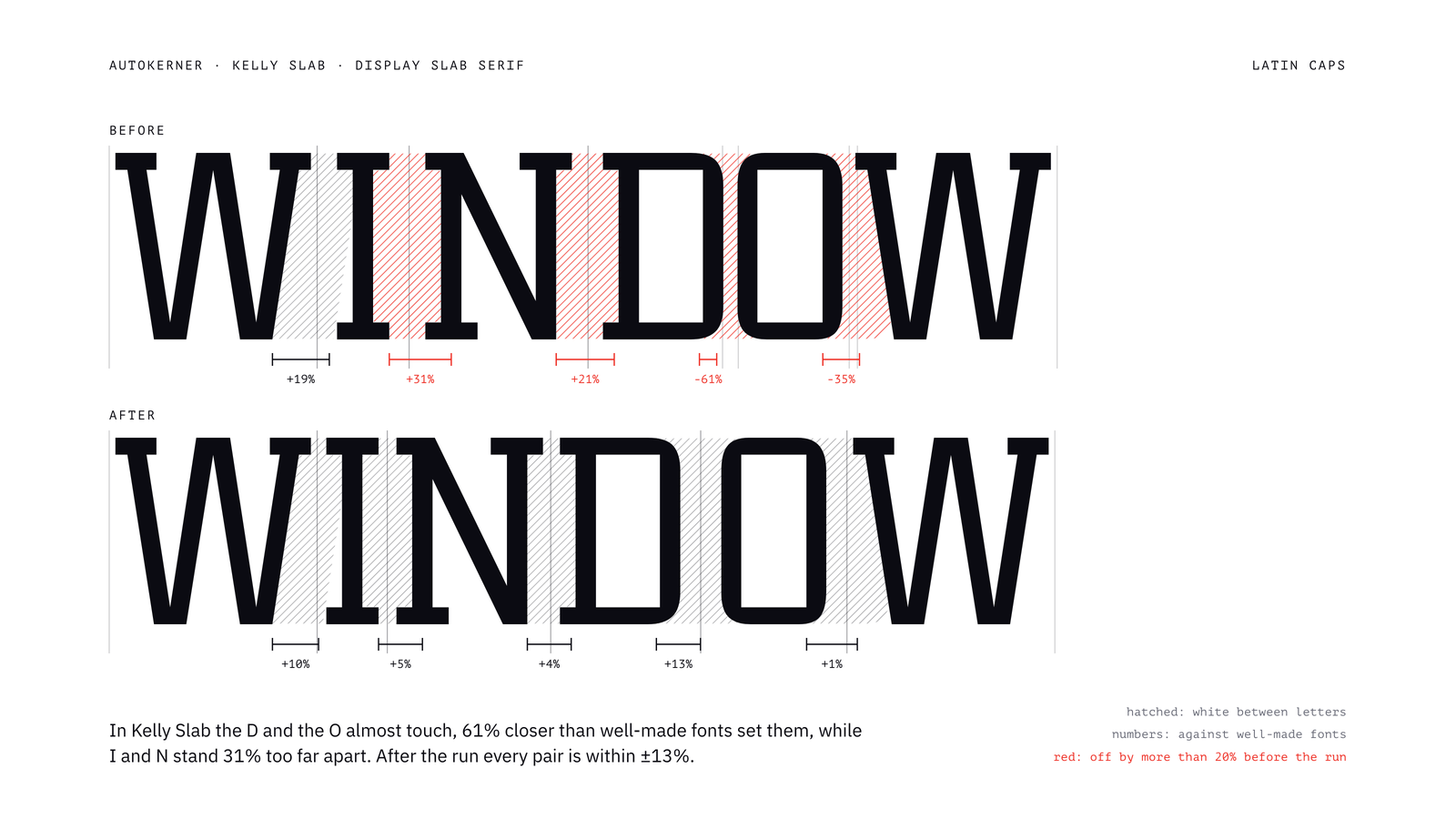
Kelly Slab, Latin caps. D and O almost touch (−61%), while I and N stand 31% too far apart; after, every pair is within ±13%.
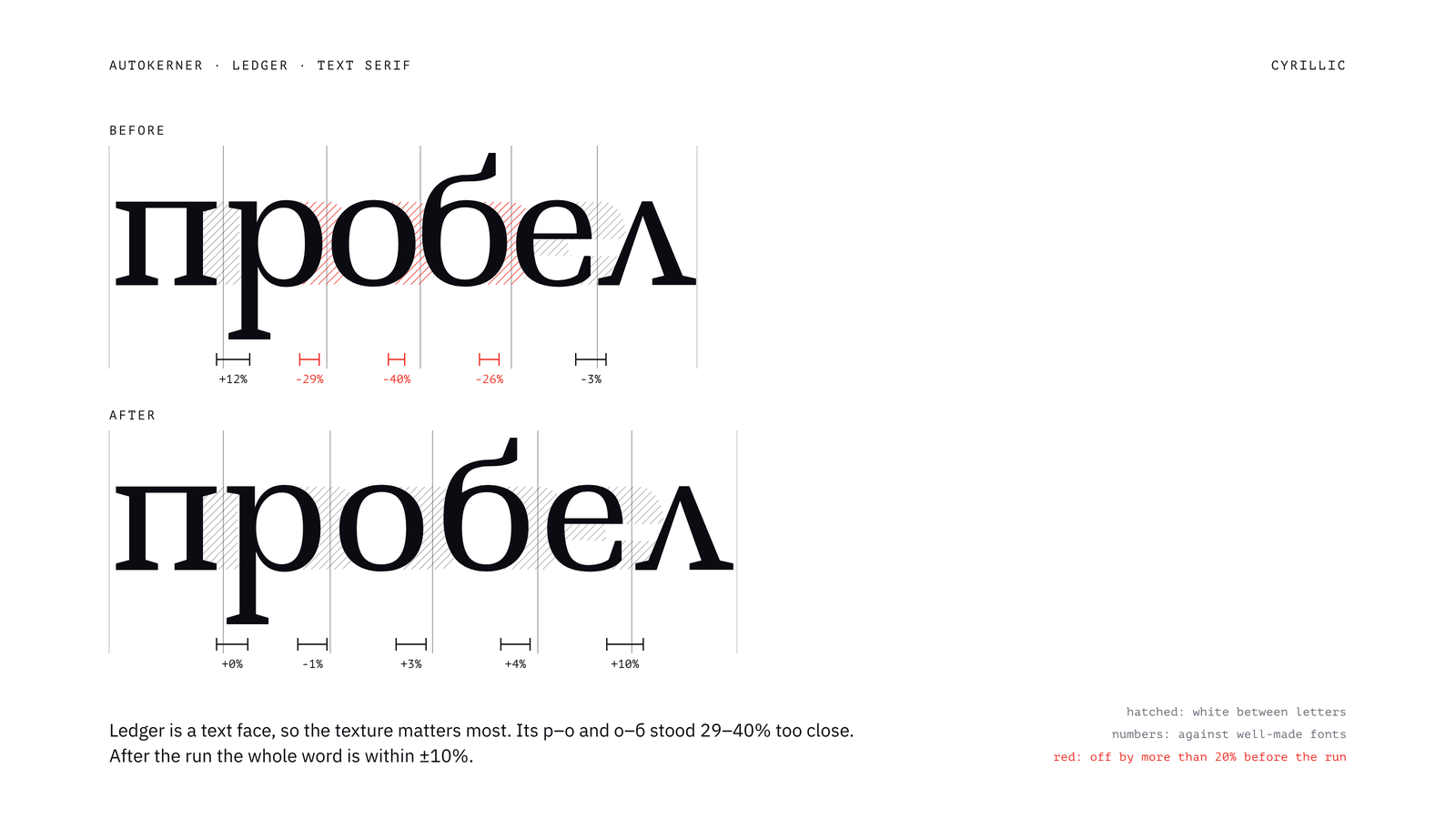
Ledger, a text face, Cyrillic lowercase. р–о and о–б were 29–40% too close; after, the whole word is within ±10%.
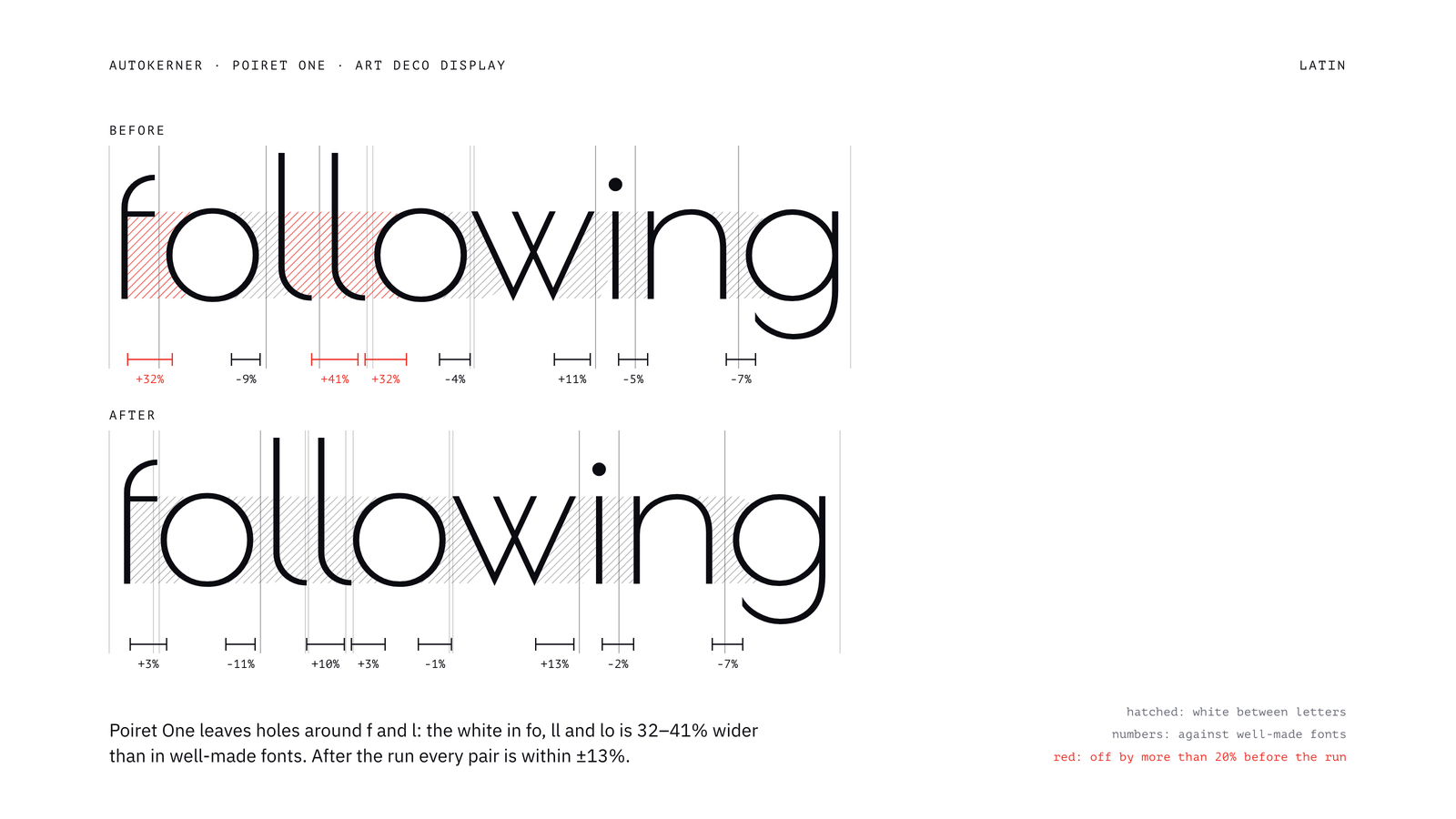
Poiret One, Latin lowercase. Holes around f and l: fo, ll and lo had 32–41% too much white; after, every pair is within ±13%.
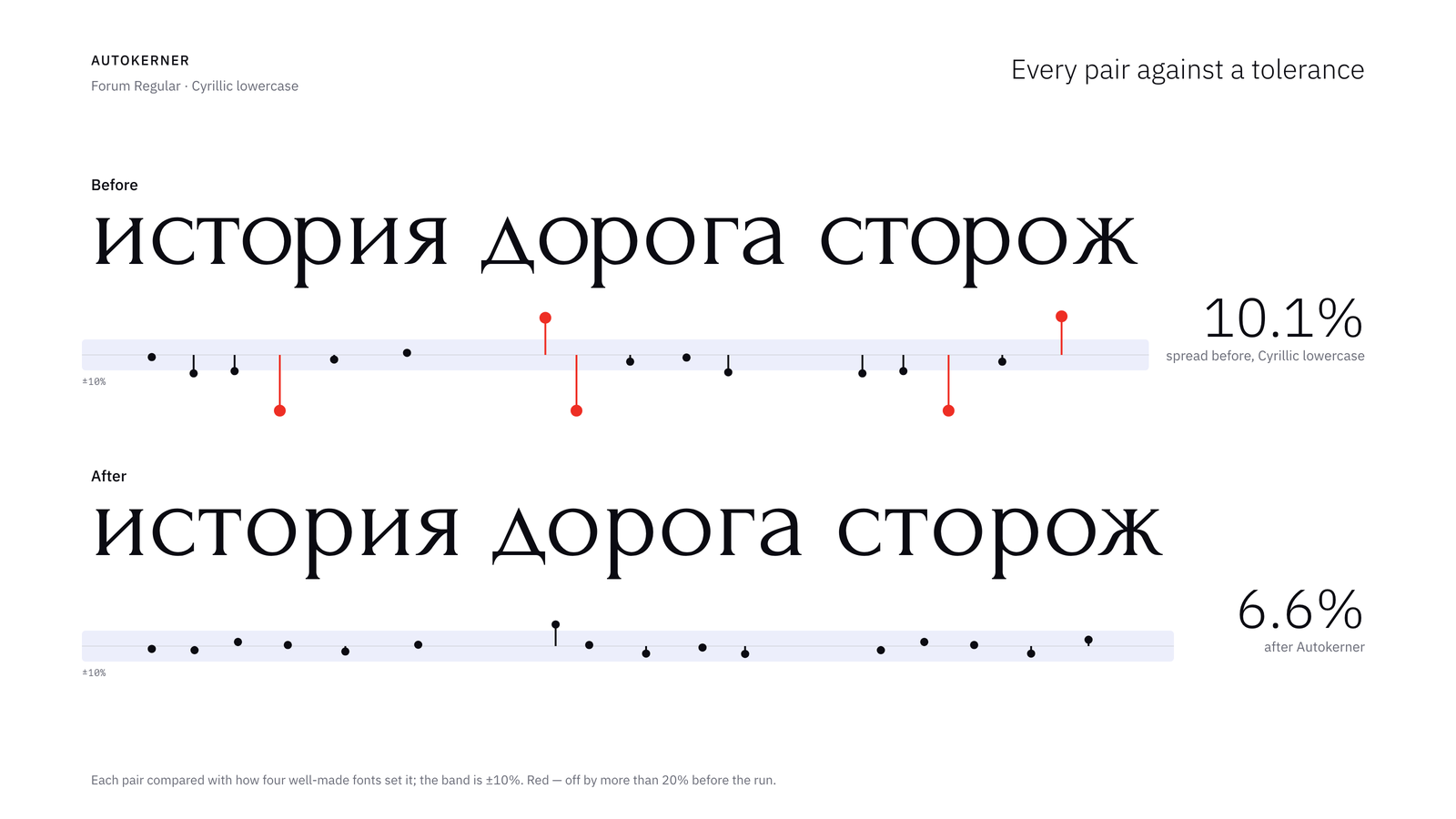
Every pair of a line against a ±10% band. Over the 160 most frequent Cyrillic lowercase pairs of Forum, the weighted spread drops from 10.1% to 6.6%.
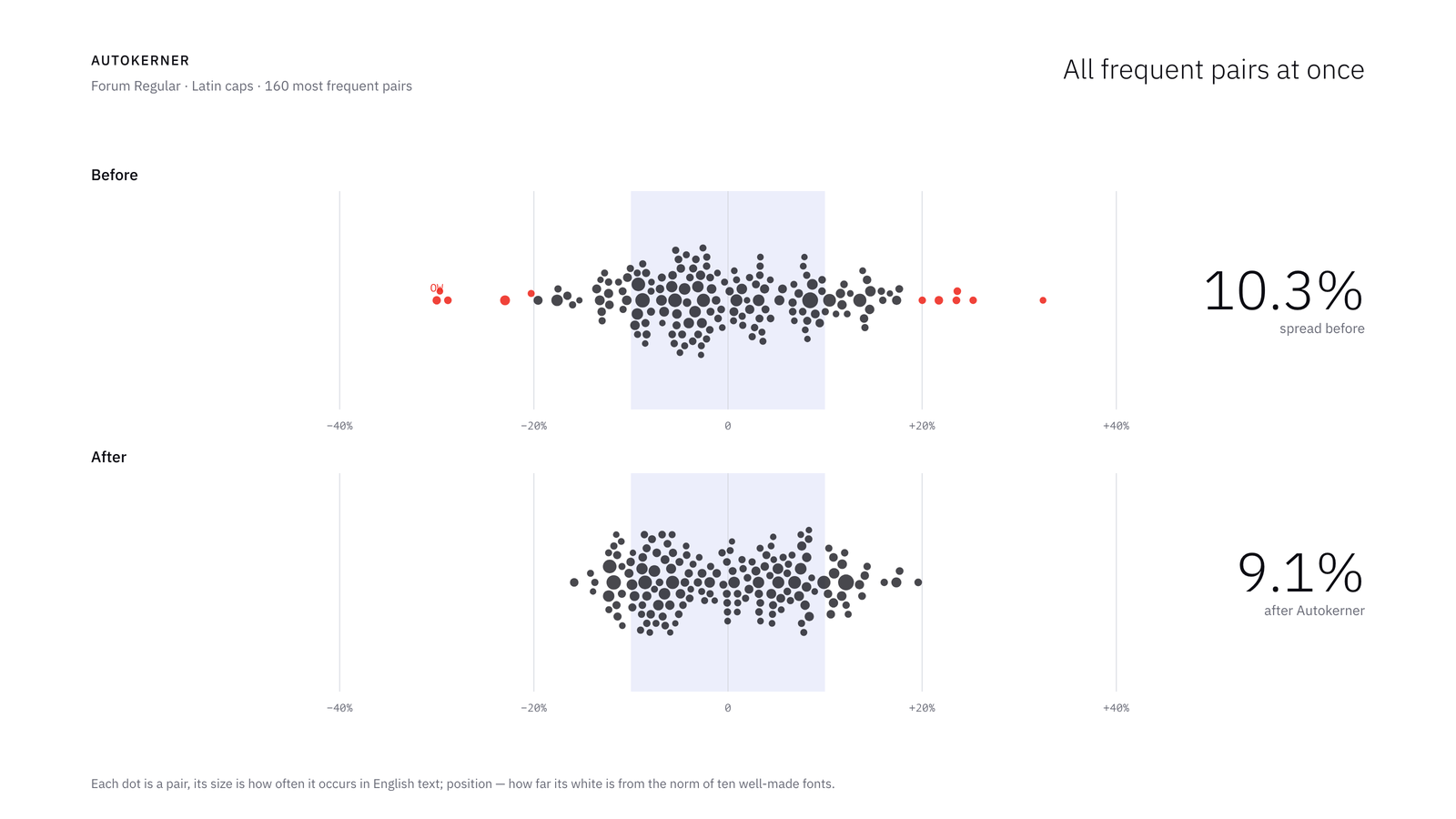
The 160 most frequent Latin cap pairs of Forum, each dot sized by how often the pair occurs in English text. The spread drops from 10.3% to 9.1%; 12 pairs were off by more than 20% before the run, none after.
Browser version
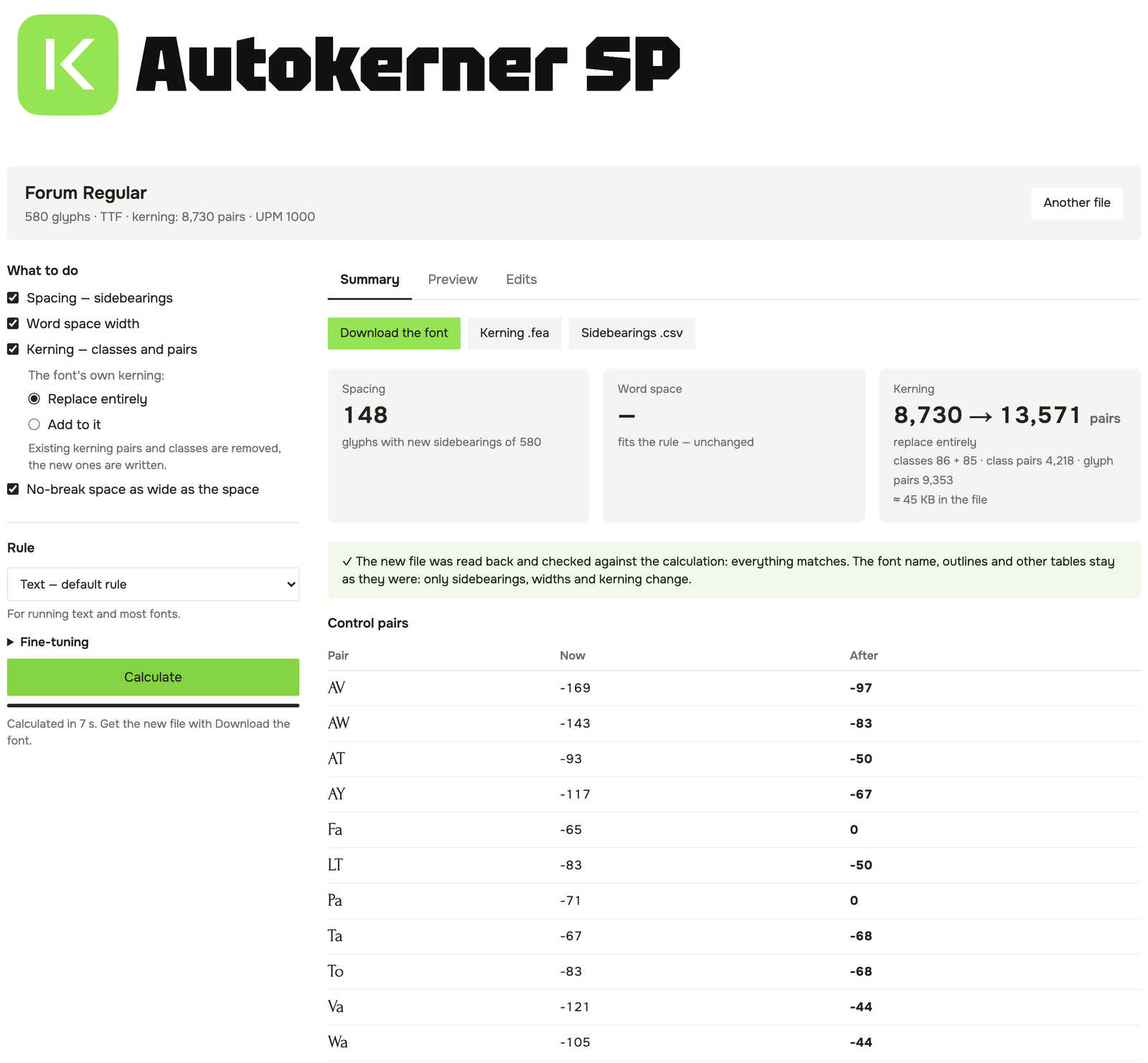
The same Forum file in the browser version: the same 148 glyphs and 8,730 → 13,571 pairs as in FontLab.
The calculation also runs on my site: pavljenko.ru/blogs/tools/autokerner. Drop a static TTF, OTF, WOFF or WOFF2 file, choose the settings and download the respaced and rekerned font. Python runs in the browser through Pyodide (WebAssembly), so the font never leaves your computer.
The browser version writes the sidebearings, the word space and a new kern lookup into GPOS (with Add to it, the font's own kerning is kept, including an old kern table). It moves mark anchors with their glyphs, reads the new file back and checks it against the calculation; the outlines and the other tables stay as they were. I compared it with the FontLab script on six fonts and 34 combinations of settings: sidebearings, widths and every calculated kerning pair are identical. Variable fonts and multi-master sources need the FontLab script.
When to use it, and when not
- It is most useful on fonts whose spacing or kerning is uneven: early versions, fonts with partial or missing kerning, a script added to an existing Latin (Cyrillic without kerning is a common case), or a quick first pass before manual work.
- On fonts that are already carefully spaced, the rule tends to give letters with open or diagonal sides (t, r, k, v, w, A, the ear of g) slightly more space than designers usually do. For such fonts, calculate only the glyphs you select, or use Add to it for kerning.
- The overall tightness of the font is kept. To make the whole font tighter or looser, use Looseness or the Display preset.
- Connecting scripts are not supported: new sidebearings break the joins.
- Only horizontal metrics change. Outlines are not redrawn; a glyph moves as a whole, with its anchors and components.
- Pairs are measured one at a time, so a pair can still collide with a third glyph. Figures with
, . :are protected by default; other sequences are worth checking in Preview.
Known limitations
- FontLab's Kerning, Classes and Features panels don't refresh by themselves after a script writes. Close and reopen them.
- A font opened from OTF or TTF keeps its old kerning as text in the
kernfeature, and FontLab exports that text instead of the kerning. Autokerner removes thekernfeature when it writes kerning, so FontLab builds it from the kerning on export. Revert restores the feature code. - In FontLab 8 kerning classes belong to each master. Calculate all masters of a variable font at once, so the classes stay the same.
- It is pure Python, as FontLab has no numpy: a font of 500 glyphs takes a few seconds per master, 2,000 glyphs about a minute.
- Developed and tested with FontLab 8.4.3 on macOS. It should work on Windows, but this has not been tested yet.
Download, license, feedback
Autokerner is free and will stay free, under the MIT license.
- Download and source: github.com/pavljenko/Autokerner
- Bug reports: GitHub Issues or pavljenko@ya.ru (Report a bug in the window copies the address). Please mention the font, what you pressed and what you saw.
I'd be glad to hear how it works on your fonts, and especially where the rule disagrees with your eye.
Sasha Pavljenko
Comments
-
I think there's promise in this, but to my eye the results posted here have issues.- Third letter in the Forum Cyrillic feels closer to its predecessor than its follower.- First three letters of WINDOW in Kelly Slab seem much tighter than last three letters.- Last letter of Ledger Cyrillic is too detached from the others.- First two letters of following in Poiret One may be a touch too tight.1
-
Spacing only improves about 1/2 the time, and gets worse in at least 1/4 of cases — though often in the reverse direction.
Kelly Slab is pretty interesting; the original DO was far too tight, but the final one is too loose, at least in comparison with other pairs in the same word.1 -
Craig Eliason said:I think there's promise in this, but to my eye the results posted here have issues.- Third letter in the Forum Cyrillic feels closer to its predecessor than its follower.- First three letters of WINDOW in Kelly Slab seem much tighter than last three letters.- Last letter of Ledger Cyrillic is too detached from the others.- First two letters of following in Poiret One may be a touch too tight.
Agreed, thank you. The four pairs come from three things in the rule:
- Open sides (С–Л, е–л). White is counted only 7% of the em deep; С, Л, л and е have about as much again just past that line, so these pairs stay loose. #1
- Serifs (WIN vs DOW). The white behind a slab counts as space: about 5% of the em per serifed side in Kelly Slab, under 1% on the rounds. So the slabs crowd and D, O stay loose. #2
- Overhangs (fo). Kerning closes a fixed 45% of the pocket under an arm; with a thin arm the eye takes its tip as the edge. #3
My ±14% check measured area too, so it missed all three. They will be fixed in a future update, and I'll post the same words here again.
Thomas Phinney said:Spacing only improves about 1/2 the time, and gets worse in at least 1/4 of cases — though often in the reverse direction.
Kelly Slab is pretty interesting; the original DO was far too tight, but the final one is too loose, at least in comparison with other pairs in the same word.That's close to my own count: 17 of the 25 pairs got better and 6 got worse by area, and by eye it's worse than that. DO is the serif case (#2): with no slabs on either side, it ends up looser than its neighbours.
I've filed all three as issues on GitHub. I'd be grateful for more tests: if you try it on your own fonts in FontLab, or in the browser version on my site, please post what you see here or open an issue.
0 -
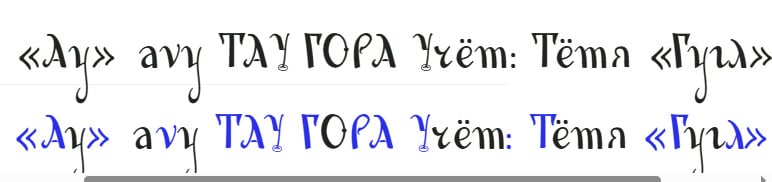 Very interesting!I must say, I’ve always dreamed of a sort of "magic bullet" that could bring auto-kerning to modern font-editing software—something with a quality comparable, at the very least, to what’s already available in Adobe’s programs.However, it seems to me that some of the decisions made by your algorithm are a bit odd. Take a look for yourself: I fed it a rather rough, work-in-progress project of mine—a sort of exploration inspired by the legacy of Konashevich. I haven’t even begun to address the kerning yet (not all the glyphs are even drawn!), and the kerning itself presents an interesting challenge due to the abundance of thin entry strokes.I can spot at least two strange instances: in the sequence "avy," the "v" has been pushed away from the "a," whereas, to my eye, it should actually be moved closer. In the word "Тётя," there’s an awkward gap between the "т" and the "я"—and for some reason, that has been left completely untouched.That said, I haven’t adjusted any settings, and—as I mentioned—the font itself is still quite raw at this stage.0
 -
I'm sure this gives "OK" output. But I'm not terribly surprised that, as Thomas noticed, the accuracy is a coin flip. Nathan Willis' PhD thesis describes letter fitting as the careful balancing of multiple axioms (profile similarity, reflection, area equality, triplet centering, interior/exterior balance, collision avoidance, vertical stroke rhythm). I'm always suspicious when someone claims that all of these concerns can be satisfied with a single simple rule. Especially if that simple rule also includes magic numbers that work for all fonts.0




Categories
- All Categories
- 47 Introductions
- 4K Typeface Design
- 501 Type Design Critiques
- 592 Type Design Software
- 1.1K Type Design Technique & Theory
- 675 Type Business
- 908 Font Technology
- 29 Punchcutting
- 544 Typography
- 129 Type Education
- 333 Type History
- 82 Type Resources
- 114 Lettering and Calligraphy
- 33 Lettering Critiques
- 81 Lettering Technique & Theory
- 580 Announcements
- 101 Events
- 116 Job Postings
- 176 Type Releases
- 186 Miscellaneous News
- 270 About TypeDrawers
- 54 TypeDrawers Announcements
- 114 Suggestions and Bug Reports