Can you adjust the layout in Printing from MainType?

WAY KYI
Posts: 140
I installed Free Maintype, played around and printed a page with characters including codepage & names.
But I can't see to find adjustment to numbers of characters on a row. It printed with default 17 char/row. Which is too small for some characters to see. I want them to be printed out as in view ( see image ), 12 char/row with 30 Points. The print isn't helpful for me like Google Font view and print.

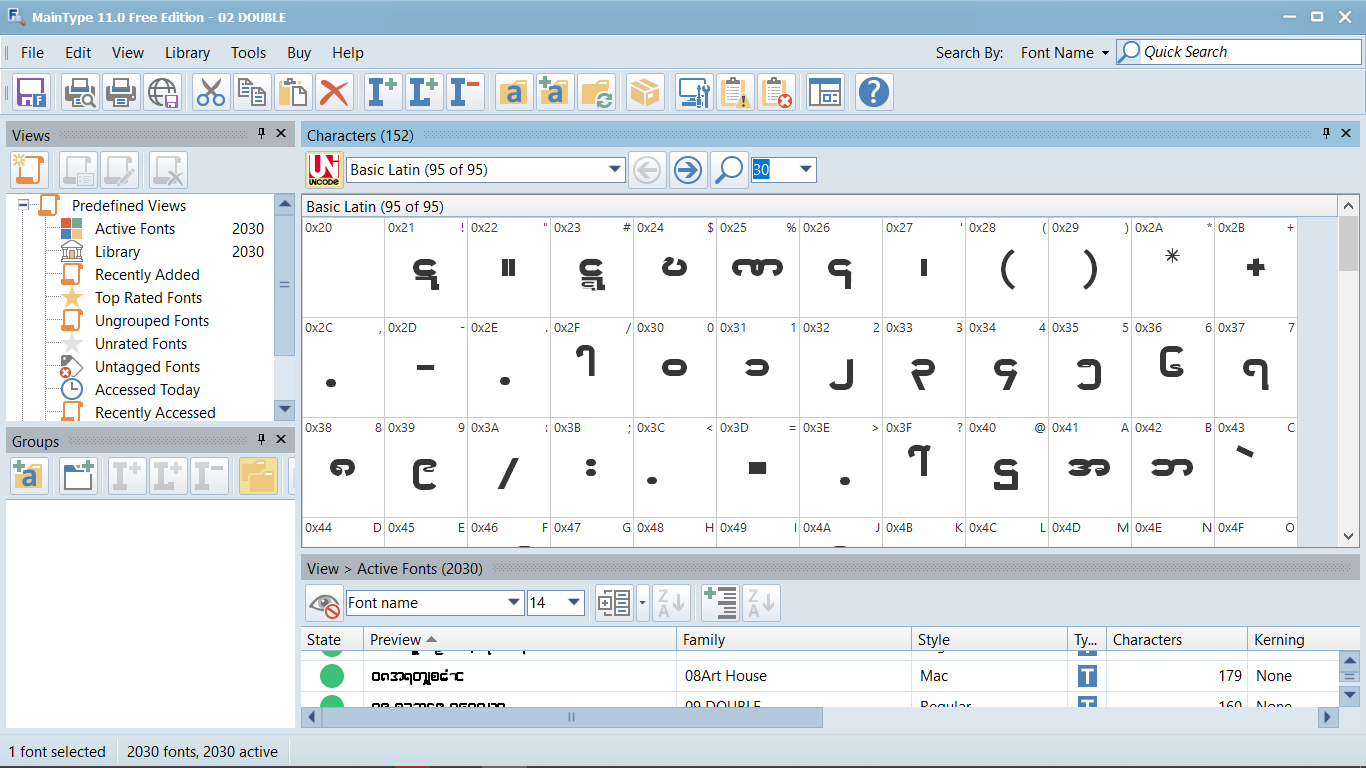
But I can't see to find adjustment to numbers of characters on a row. It printed with default 17 char/row. Which is too small for some characters to see. I want them to be printed out as in view ( see image ), 12 char/row with 30 Points. The print isn't helpful for me like Google Font view and print.

Tagged:
0
Comments
-
I posted in FontCreator forum and I got help from Bhikkhu Pesala and solved the problem. The solution is print to PDF with A5 size then print PDF at fit to page option to the printer. We could close this issue now. Thanks0
Categories
- All Categories
- 47 Introductions
- 4K Typeface Design
- 501 Type Design Critiques
- 593 Type Design Software
- 1.1K Type Design Technique & Theory
- 675 Type Business
- 908 Font Technology
- 29 Punchcutting
- 544 Typography
- 129 Type Education
- 333 Type History
- 82 Type Resources
- 114 Lettering and Calligraphy
- 33 Lettering Critiques
- 81 Lettering Technique & Theory
- 580 Announcements
- 101 Events
- 116 Job Postings
- 176 Type Releases
- 186 Miscellaneous News
- 270 About TypeDrawers
- 54 TypeDrawers Announcements
- 114 Suggestions and Bug Reports