Marktune, small utility for fixing Arabic mark collisions

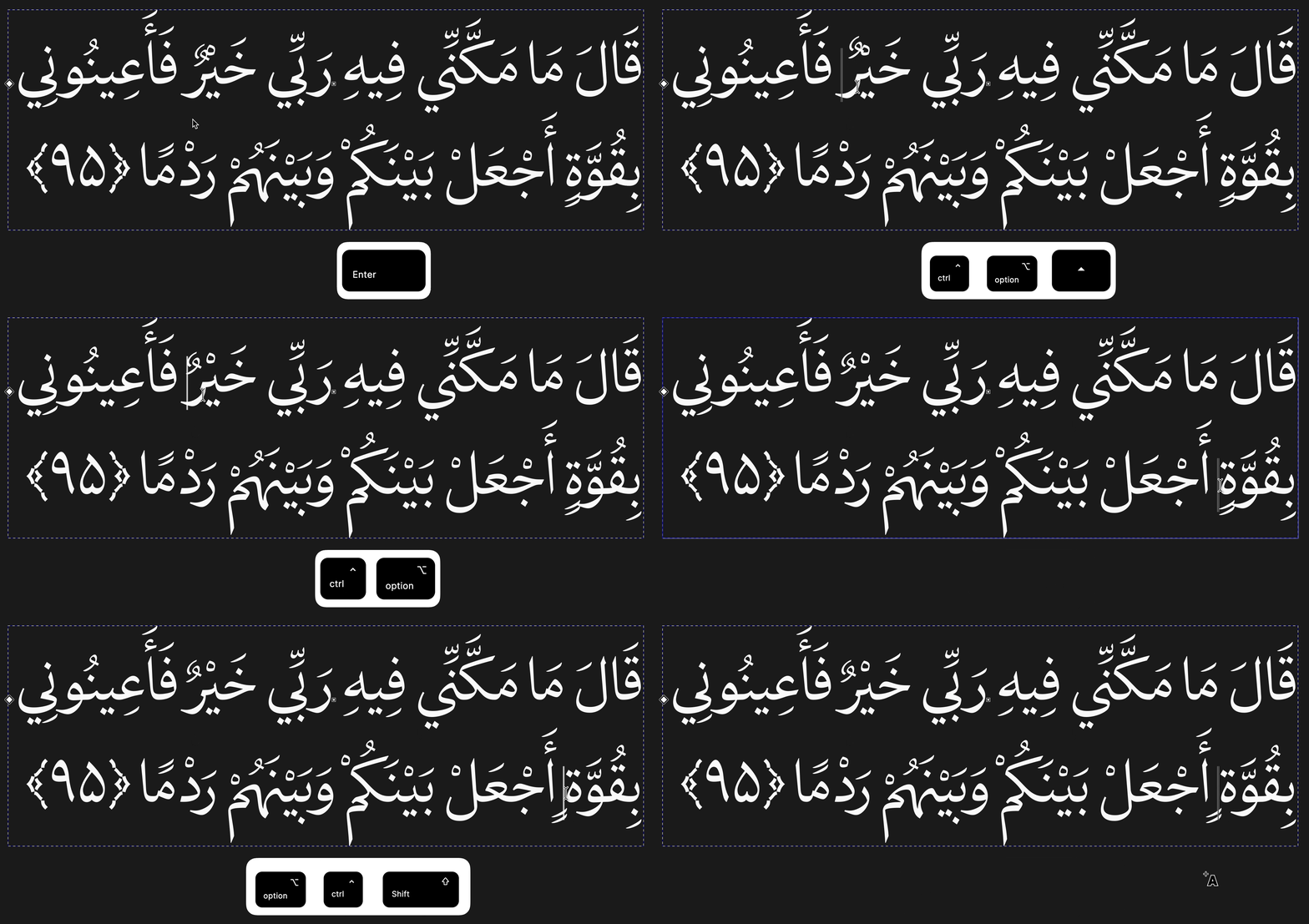
Marktune is a small utility for fixing Arabic mark collisions in fonts.
In Arabic fonts combining marks (fatha, damma, sukun, etc.) can visually overlap(especially in Quranic phrases). Marktune inserts special control characters, mapped in the font as positional offsets, at the text caret via configurable global hotkeys, shifting mark placement. (A CGJ(Combining Grapheme Joiner) is also inserted between these control characters, to bypass AMTRA.)
Key points:
- Cross-platform: macOS and Windows
- Hotkeys and codepoints are configured via a simple
config.json - Runs from the system tray, with a quick enable/disable toggle
- Core cluster parsing/serialization logic is written in Rust and is platform-independent
- No interference with text shaping at all, the whole process is designed to be very lightweight and generally predictable everywhere.
Marktune is free and open-source, under the MIT license:
https://github.com/fontamin/Marktune
The project tree also includes a font-integration folder, containing a Python script with accompanying bash and batch files to generate the proper mkmk feature easily, plus a Glyphs file with the control characters ready to be copied. By following simple steps, any font can be compatible with Marktune.(For older fonts, we may in the future look into injecting the mkmk feature and control characters at a lower level, using tools such as ttx, as a post-process step.)
Using a decomposed structure, it’s also possible to shift a glyph’s dots independently of its marks. This has been tested and works, but a dedicated set of shortcuts entry isn’t implemented in Marktune yet.
This project was built with the help of AI tools (Claude and ChatGPT), used for coding assistance throughout development.
(There are more technical and practical details in the repo.)
Comments
-
Marktune inserts special control charactersWhat are these control characters, and what does their presence do to the text in terms of searching, sorting, spellchecking, switching to a non-Marktune font, and similar processing operations?0
-
John Hudson said:Marktune inserts special control charactersWhat are these control characters, and what does their presence do to the text in terms of searching, sorting, spellchecking, switching to a non-Marktune font, and similar processing operations?
These are supposed to be less common, empty Arabic Mark characters (their codepoints can be changed globally via Marktune's
config.json, not per font). They have real Unicode values, so they become part of the text stream, which has some side effects:- Font switching: if the new font doesn't support characters, they typically render as
.notdef/empty boxes, or fall back to a system font if one supports that Unicode range. - Search: exact-match search can fail if these invisible characters interrupt otherwise-identical words, unless the search normalizes/strips them.
- Spellcheck: most spellcheckers don't recognize them and may either flag the word or silently ignore the character, depending on its Unicode category.
- Sorting: since they sit after visible marks, they can affect collation order unless treated as ignorable by the sorting algorithm.
These trade-offs are inherent to the caret-based mark-shifting approach, and are worth being aware of before using Marktune on text meant for search/sort-heavy workflows.
0 - Font switching: if the new font doesn't support characters, they typically render as
-
These are supposed to be less common, empty Arabic Mark characters .... They have real Unicode values...I am still unsure what these characters are. What codepoints are you using?
0 -
According to some slightly buried documentation, the code points (besides the abovementioned CGJ) are:John Hudson said:I am still unsure what these characters are. What codepoints are you using?- U+06DF ARABIC SMALL HIGH ROUNDED ZERO
- U+06E0 ARABIC SMALL HIGH UPRIGHT RECTANGULAR ZERO
- U+06EB ARABIC EMPTY CENTRE HIGH STOP
- U+06EC ARABIC ROUNDED HIGH STOP WITH FILLED CENTRE
- U+08ED ARABIC TONE ONE DOT BELOW
- U+08EE ARABIC TONE TWO DOTS BELOW
- U+08EF ARABIC TONE LOOP BELOW
- U+08F2 ARABIC OPEN KASRATAN
1 -
The codepoints are customizable. I couldn't find better candidates for now. They need to be Arabic marks (or Arabic letters set to the mark class, but that's even worse) so they don't break Arabic joining behavior. They're not meant to be control characters in the Unicode sense; they're just being used as controls within the font.
0 -
Wouldn't it be easier to embed the context and corrections in the font, instead of giving the user the tedious work of fixing them? There should not be a lot of cases if you can use a word frequency list and place marks on them to find collisions.I would advise against using any code-points for triggering typographic preferences. They destroy text readability for machines or the blind.3
-
Thanks for the feedback. Collisions are fixed inside the font as far as possible by altenate substitutions and contextual positionings, and that should always be the first line of defense. But it's practically impossible to anticipate every combination, especially in texts like Quranic phrases where the same marks stack repeatedly in unusual sequences. So the user isn't expected to deal with this constantly. Marktune is meant for the rare leftover cases that a font can't cover in advance.You're also right about machine readability and accessibility. These characters do add noise for screen readers and other text processing. Although Marktune and similar tools can work on the web too, the main goal is correct display in print, where the final output is visual and the underlying text no longer matters.Personally, I think the real solution should come from Unicode itself: dedicated, properly defined code points for this purpose, ones that are joining but default-ignorable, so they wouldn't affect readability, search, or accessibility, while still allowing fine-tuned mark placement.0
-
The Middle East version of InDesign included a mark positioning adjustment tool, with presets for tight and loose positioning, as well as enabling overrides for individual selected marks. It wasn’t perfect, but I think it was an example of where Unicode is likely to say that this kind of adjustment should reside: at a higher level above the text content, in layout software.1
-
Thanks, I think you mean the Middle East version of Adobe InDesign(?), which has diacritic positioning presets and manual overrides at the layout level. That's a good approach in the apps that support it, since the text stays clean and the configuration is saved in the file as text block properties. The limitation is that it only works inside that specific software. Marktune targets the cases where text needs to carry its own adjustment across apps that have no such feature (other design tools, browsers, OS text fields). I agree that ideally this would be standardized at a higher level than the text content, but only if it works everywhere.
0 -
Sorry, yes, InDesign. Corrected in edit.0
-
It’s a problematic crossover of character and glyph space, because on the one hand you want it to be exchangeable at the text level, but intrinsically it needs to be design-specific at the font level. Your framework enables that by making the implementation of the adjustments particular to the font, while the triggers for those adjustments reside in the text.Ultimately, I think a robust solution to complex positioning relationships — not only mark position adjustment, but also spacing adjustment, and the interaction of those two — has to reside in glyph space, independent of the text in character space. That means either improved tools on the OTL production side that generate adjustments as contextual rules, or a new layout model that can handle the adjustments in something more elegant than a massive set of GPOS lookups.1
-
Thank you for taking the time to share your insight. I agree with you overall, though I may differ on some of the details, and I know these are questions for the specialists in Unicode, text layout, and OpenType to weigh in on. I really appreciate your feedback.
0 -
I'm actually quite positive about this. Yes, putting layout-level control into "character space" is unfortunate and causes potential issues (screen readers, dirty text if you change the font) but these are acceptable trade-offs for the particular use case: if you see this as being used to typesetting printed text in one particular font rather than a general purpose solution, the "screen reader"/"change font" objections go away. But it's only unfortunate as a consequence of the limitations of the technology available. I see the need to give the user control over the placement of marks, in a way that works well across applications - yes, a better layout model would be the optimal solution but we're not in that world; and improved tooling (WASM shaping is the obvious answer here) can help you to avoid collisions in ways determined by the designer, but still won't give the user flexibility to alter things the way they want.
It will annoy the purists, and it should. But for getting the particular job done I think it's a clever hack that enables something that's otherwise impossible.0 -
Thank you Simon, this means a lot coming from someone with your experience. I completely agree with your framing: Marktune is a pragmatic workaround for a specific job, mainly typesetting printed text in a particular font, and not the ultimate solution. Your point about user flexibility is exactly why I built it. Even with better tooling on the font side, users still can't adjust things the way they want almost anywhere. Given your background, your view carries a lot of weight for me, and I appreciate the support.
0


Categories
- All Categories
- 47 Introductions
- 4K Typeface Design
- 501 Type Design Critiques
- 592 Type Design Software
- 1.1K Type Design Technique & Theory
- 675 Type Business
- 908 Font Technology
- 29 Punchcutting
- 544 Typography
- 129 Type Education
- 333 Type History
- 82 Type Resources
- 114 Lettering and Calligraphy
- 33 Lettering Critiques
- 81 Lettering Technique & Theory
- 580 Announcements
- 101 Events
- 116 Job Postings
- 176 Type Releases
- 186 Miscellaneous News
- 270 About TypeDrawers
- 54 TypeDrawers Announcements
- 114 Suggestions and Bug Reports