FontFridge: an enhanced Google Fonts filter

chingru
Posts: 8
▌ https://font.chingru.com ▐

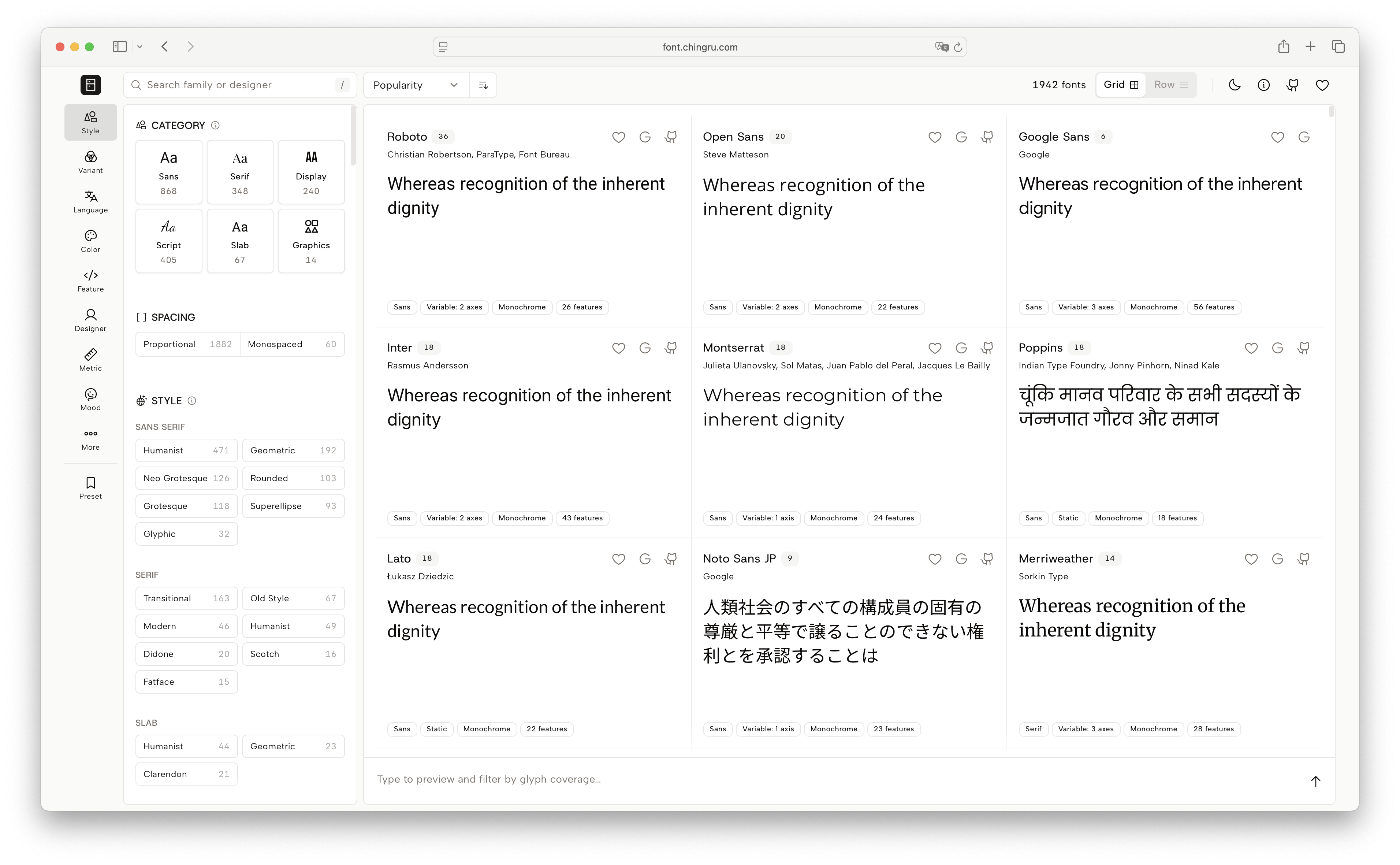
Google Fonts is a great place to dig for treasure, but its filtering is far too weak. Right now I can only filter for Variable Font, but sometimes I want to be more specific about whether it's the weight (wght), width (wdth), or optical size (opsz) axis.
My projects also occasionally depend on particular OpenType features, and I need to find which families offer stylistic sets (ss##) or historical ligatures (hlig). This comes up especially in font engineering, when I am curious how a certain feature was implemented and open source projects turn out to be the best teaching material. Google Fonts' filtering tools just are not there yet, so I built FontFridge.
I think of FontFridge as an enhanced Google Fonts filter. OpenType features, variable font axes, writing systems, languages, and on through UPM, hinting, color font format, x-height, cap-height ratio and more, all filterable.
Each font family page gives you live previews of every named instance, editable specimen text, a glyph browser organized by Unicode block, metrics data, designer bios, license, and ready-to-use embed code for Google Fonts, Bunny Fonts and Fontsource.
This site is only a directory and a filter. Every family stays under its original license. My thanks to all the open source designers and developers behind them.
The site itself is MIT license with source at https://github.com/rutopio/font-fridge
Reports of any data or tagging errors are welcome, as are suggestions for new filter criteria, or any other feedback and ideas!
Tagged:
9
Comments
-
Fantastic tool! I’ve often found the Google Fonts filters to be limited. Is there a way to filter by a specific supported Unicode character? Say I want to only see options that include a rare glyph like 2E4B ⹋ TRIPLE DAGGER, which isn’t necessarily linked to a language.0
-
Google Fonts does offer filtering by character. In the Filters panel, thereʼs a text‐entry box headed “Preview” (which may display the placeholder text “Type something”); enter the character(s) you wish to filter for. Unfortunately, at the moment the triple dagger is so rare as to not be found at all. If you filter by more than one character, youʼll get logical‐OR results; for example, right now I filtered by DOUBLE DAGGER + TRIPLE DAGGER (“‡⹋”) and got a listing of 104 fonts, all of which supported DOUBLE DAGGER and not TRIPLE DAGGER.Tofu Type Foundry said:I’ve often found the Google Fonts filters to be limited. Is there a way to filter by a specific supported Unicode character? Say I want to only see options that include a rare glyph like 2E4B ⹋ TRIPLE DAGGER, which isn’t necessarily linked to a language.1 -
Nice tool. The term "Superellipse" is quite specific. I’d call that filter “Square” or “Squarish” if you want to be more accurate.1
-
Oops, I now see that this category was defined by Google Fonts, not you. I guess it’s something for @Dave Crosslandto consider.0
-
OFF-TOPIC
My favourite story related to the superellipse is Piet Hein’s attempted intervention in the diplomatic disagreement over the shape of the Vietnam peace conference table.3 -
Iosevka Charon does seem to support U+2E4B TRIPLE DAGGER. I'm not sure why it doesn't show up using the Google filter, but I could find it using my font manager Typeface app.Erik said:
Google Fonts does offer filtering by character. In the Filters panel, thereʼs a text‐entry box headed “Preview” (which may display the placeholder text “Type something”); enter the character(s) you wish to filter for. Unfortunately, at the moment the triple dagger is so rare as to not be found at all. If you filter by more than one character, youʼll get logical‐OR results; for example, right now I filtered by DOUBLE DAGGER + TRIPLE DAGGER (“‡⹋”) and got a listing of 104 fonts, all of which supported DOUBLE DAGGER and not TRIPLE DAGGER.Tofu Type Foundry said:I’ve often found the Google Fonts filters to be limited. Is there a way to filter by a specific supported Unicode character? Say I want to only see options that include a rare glyph like 2E4B ⹋ TRIPLE DAGGER, which isn’t necessarily linked to a language.2 -
This is a likely to be a problem with the Google Fonts subsetting definitions. No definitions contain TRIPLE DAGGER, so it won't appear in any subsetted fonts served by Google Fonts. (There are various problems with the subsetting approach related to combining and common script codepoints, but the best solution is to move everything to Incremental Font Transfer instead of subsetting and that's taking a long time.)5
-
Thanks, I stand corrected! (And Iosevka Charon Mono supports it, too!) I guess I should have said, “Google Fonts does offer flawed filtering by character.”Floor van Steeg said:
Iosevka Charon does seem to support U+2E4B TRIPLE DAGGER. I'm not sure why it doesn't show up using the Google filter, but I could find it using my font manager Typeface app.3 -
Quick side note: You might want to rethink the name; FontColle comes across as pretty awkward (at least to me). If you mean to pronounce Colle in one syllable, it would be less confusing to just write Coll... and if you mean something like [kə.ˈlɛ], that's highly illegal in the phonotactics of English.
4 -
Yeah, I keep thinking of fonts being brought to me by Lassie. 🐾0
-
Christian Thalmann said:Quick side note: You might want to rethink the name; FontColle comes across as pretty awkward (at least to me). If you mean to pronounce Colle in one syllable, it would be less confusing to just write Coll... and if you mean something like [kə.ˈlɛ], that's highly illegal in the phonotactics of English.
Honestly, naming is one of the hardest parts of a product. A lot of the good names are already taken...
Colle does come from Collection, but more specifically from the Japanese abbreviation of the loanword コレクション. It’s commonly used that way for series or themed collections.
But you might be right. Maybe a more general or easier to understand name would work better. I’ll think about it. Thanks.
2 -
I think the name is fine.1
-
Tofu Type Foundry said:Fantastic tool! I’ve often found the Google Fonts filters to be limited. Is there a way to filter by a specific supported Unicode character? Say I want to only see options that include a rare glyph like 2E4B ⹋ TRIPLE DAGGER, which isn’t necessarily linked to a language.Erik said:
Google Fonts does offer filtering by character. In the Filters panel, thereʼs a text‐entry box headed “Preview” (which may display the placeholder text “Type something”); enter the character(s) you wish to filter for. Unfortunately, at the moment the triple dagger is so rare as to not be found at all. If you filter by more than one character, youʼll get logical‐OR results; for example, right now I filtered by DOUBLE DAGGER + TRIPLE DAGGER (“‡⹋”) and got a listing of 104 fonts, all of which supported DOUBLE DAGGER and not TRIPLE DAGGER.Tofu Type Foundry said:I’ve often found the Google Fonts filters to be limited. Is there a way to filter by a specific supported Unicode character? Say I want to only see options that include a rare glyph like 2E4B ⹋ TRIPLE DAGGER, which isn’t necessarily linked to a language.
Hi, I just updated something. Now when there's a preview sentence, it ONLY shows fonts that contain all of those characters.Searching for both "‡" and "⹋" on FontColle should now correctly filter down to the 7 fonts that actually have them.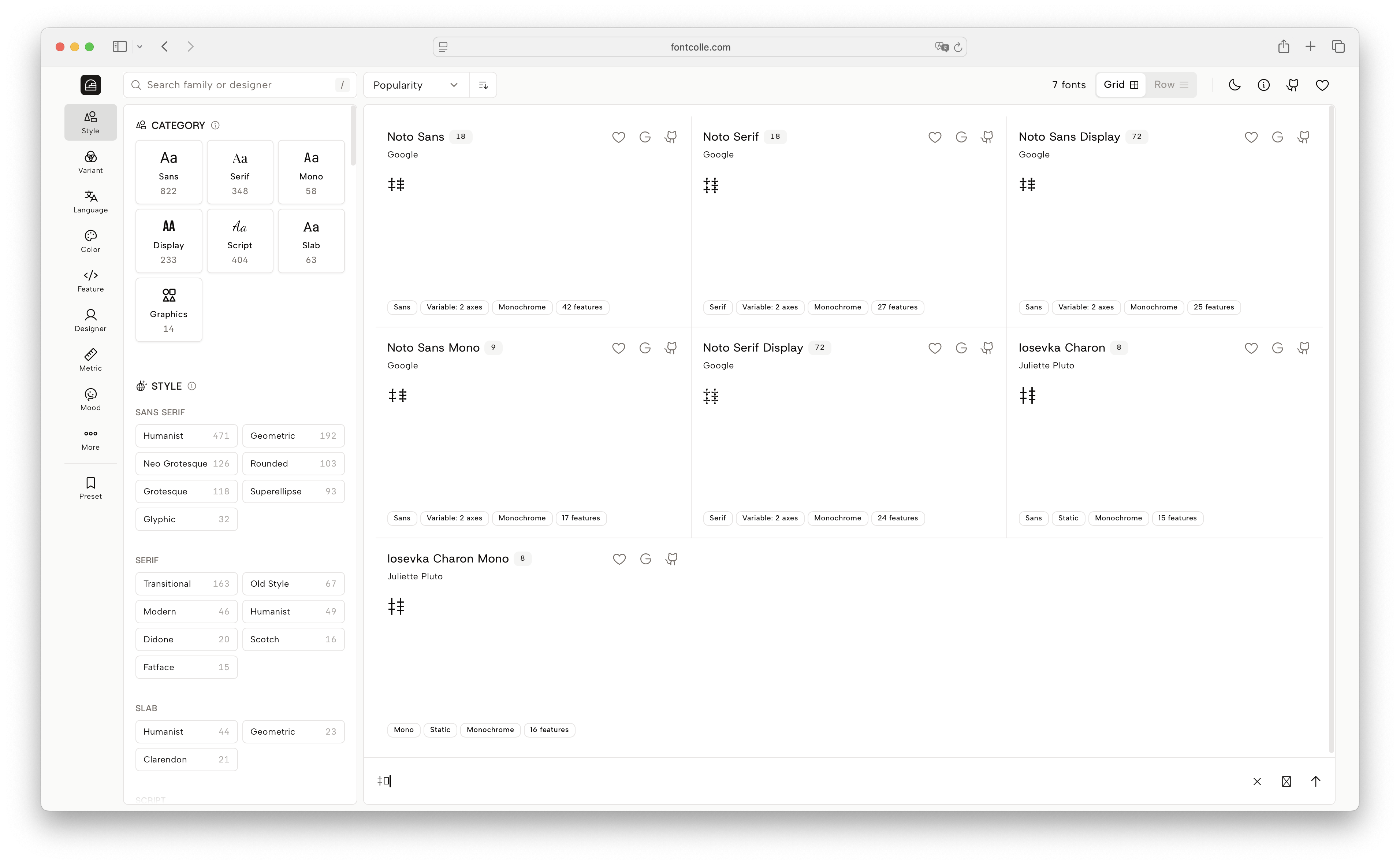 Simon Cozens said:This is a likely to be a problem with the Google Fonts subsetting definitions. No definitions contain TRIPLE DAGGER, so it won't appear in any subsetted fonts served by Google Fonts. (There are various problems with the subsetting approach related to combining and common script codepoints, but the best solution is to move everything to Incremental Font Transfer instead of subsetting and that's taking a long time.)
As for ⹋ TRIPLE DAGGER U+2E4B, taking Noto Sans as an example, the original css has 8 subsets (@font-face), and here is every unicode-range it lists:- cyrillic-ext: U+0460-052F, U+1C80-1C8A, U+20B4, U+2DE0-2DFF, U+A640-A69F, U+FE2E-FE2F;
- cyrillic: U+0301, U+0400-045F, U+0490-0491, U+04B0-04B1, U+2116;
- devanagari: U+0900-097F, U+1CD0-1CF9, U+200C-200D, U+20A8, U+20B9, U+20F0, U+25CC, U+A830-A839, U+A8E0-A8FF, U+11B00-11B09;
- greek-ext: U+1F00-1FFF;
- greek: U+0370-0377, U+037A-037F, U+0384-038A, U+038C, U+038E-03A1, U+03A3-03FF;
- vietnamese: U+0102-0103, U+0110-0111, U+0128-0129, U+0168-0169, U+01A0-01A1, U+01AF-01B0, U+0300-0301, U+0303-0304, U+0308-0309, U+0323, U+0329, U+1EA0-1EF9, U+20AB;
- latin-ext: U+0100-02BA, U+02BD-02C5, U+02C7-02CC, U+02CE-02D7, U+02DD-02FF, U+0304, U+0308, U+0329, U+1D00-1DBF, U+1E00-1E9F, U+1EF2-1EFF, U+2020, U+20A0-20AB, U+20AD-20C0, U+2113, U+2C60-2C7F, U+A720-A7FF;
- latin: U+0000-00FF, U+0131, U+0152-0153, U+02BB-02BC, U+02C6, U+02DA, U+02DC, U+0304, U+0308, U+0329, U+2000-206F, U+20AC, U+2122, U+2191, U+2193, U+2212, U+2215, U+FEFF, U+FFFD;
None of them contain ⹋ TRIPLE DAGGER U+2E4B. My guess is that's exactly why Google Fonts can not filter for it properly.3 -
Kudos!0
-
FontColle is now FontFridge!
- Renamed FontColle to FontFridge to avoid confusion over how it's pronounced. The site has moved to https://font.chingru.com
- Removed the Mono class from Category, replaced with a separate Proportional / Monospaced filter.
- When you type preview text, the list now shows only fonts that support those characters, hiding ones with missing glyphs. You can turn this off to show all fonts.
- Added an axis sampling grid at the top of the Instances tab.
- The detail page now remembers the last tab you had open instead of always resetting to Instances.
- Favorites and presets can now be exported and imported.
- Added a font size slider to the list area to adjust the preview text size.
- Added a line height slider to the Paragraph tab.
Thanks to everyone who left a comment or sent me a DM with feedback!3 -
Cool name! 🧊😁 Evokes a good place to poke around for some tasty fonts to chew on…1
-
- When you type preview text, the list now shows only fonts that support those characters, hiding ones with missing glyphs. You can turn this off to show all fonts.
 1
1 -
wow!!! thank u for your great work0
-
Amazing!! I found a few new typefaces I never saw, and I'm all about lurking searching for typefaces.Question, would it be possible to add a "most recently updated" sorting? I know that we already have the maintenance filter, but I'm not sure if it also sorts them from most recent to oldest.0
-
Yes, FontFridge works much better as a name!2
-
Cristóbal Alarcón said:Amazing!! I found a few new typefaces I never saw, and I'm all about lurking searching for typefaces.Question, would it be possible to add a "most recently updated" sorting? I know that we already have the maintenance filter, but I'm not sure if it also sorts them from most recent to oldest.
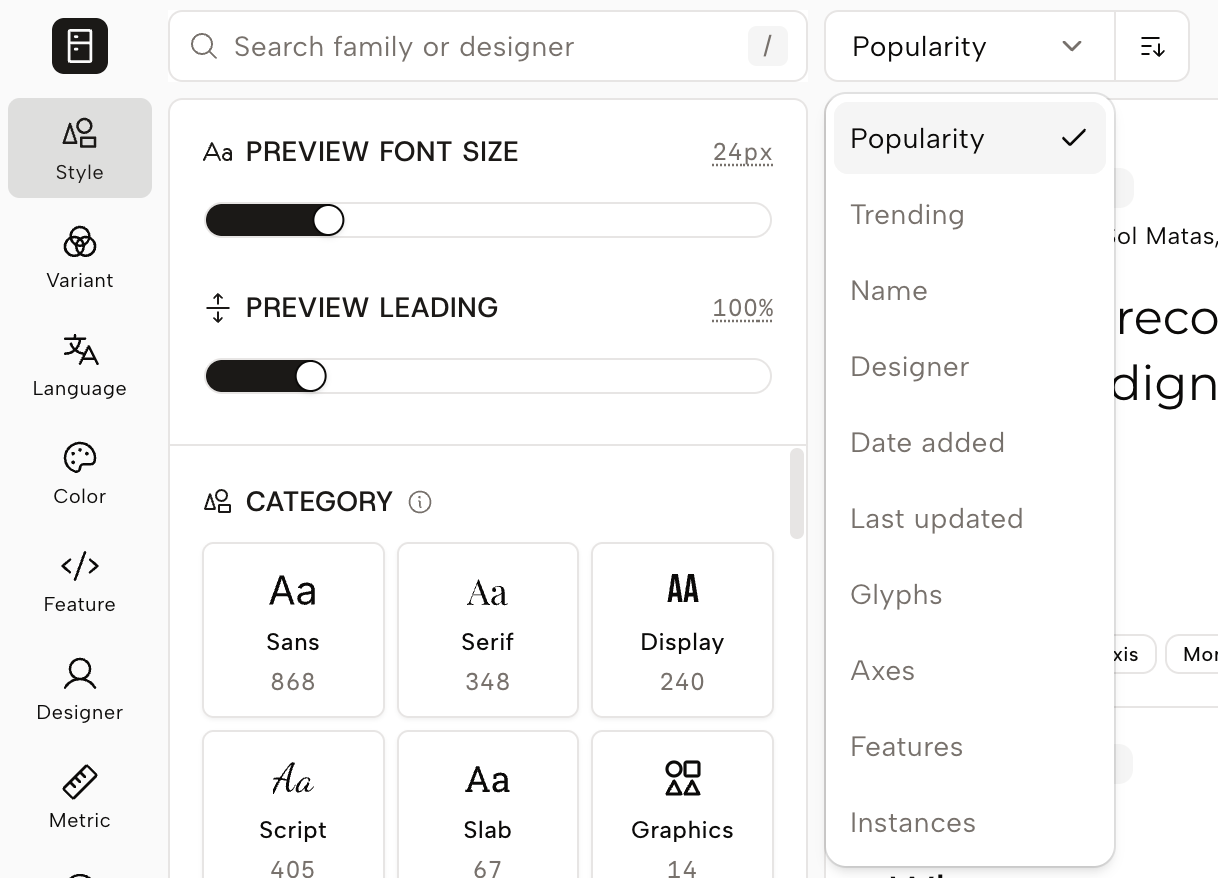
New Update:
- New sort options: instance, feature, last updated
- List view: new leading control for line height (default 100%)
- Grid/row items now truncate at 10 lines, allowing to show more glyphs
- Max column count in grid view is adjustable (default 3; not guaranteed on narrow screens)
2 -
I'm testing the recently updated sorting, and its showing Alegreya fonts between the first ten results of most recently updated, but the Github page shows no changes since 8 years.What information is it using for its sorting?For example, these are my filter settings right now. With sorting from oldest to newest I get these two fonts side by side:
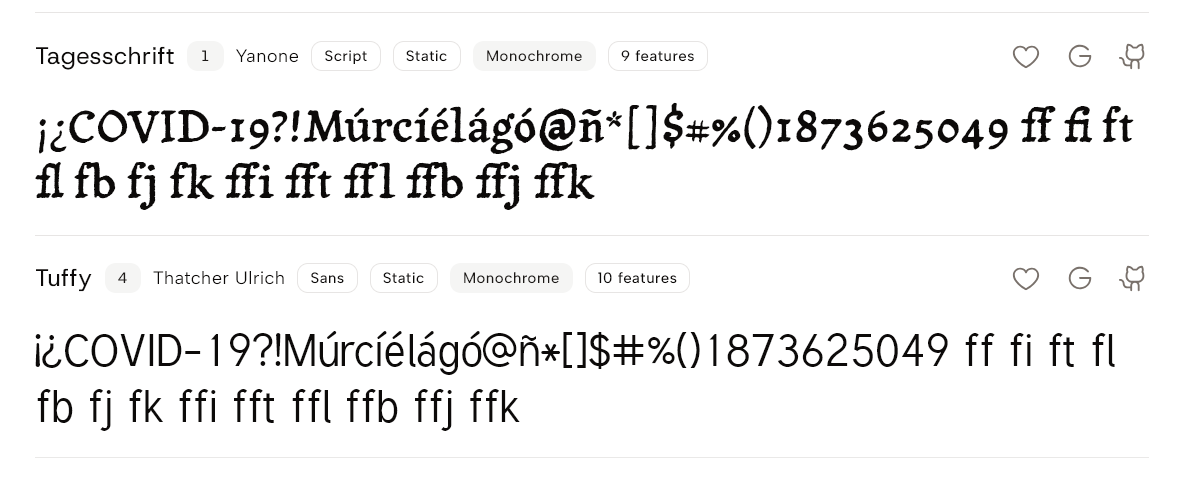 The first one lastest Github update/push was two years ago, and the second one latest update/push was 13 years ago. At the moment I'm confused what information is this sorting using.0
 -
I suspect this is coming from the metadata at https://fonts.google.com/metadata/fonts which does indeed show that Alegreya was updated 2026-06-30. But "updated" here includes metadata - the font binary didn't change, but the designer's email, foundry name, minisite URL, etc. did... I guess if you want to check specifically when the binary was updated, looking at the git history is a better option.2
-
Cristóbal Alarcón said:I'm testing the recently updated sorting, and its showing Alegreya fonts between the first ten results of most recently updated, but the Github page shows no changes since 8 years.What information is it using for its sorting?For example, these are my filter settings right now. With sorting from oldest to newest I get these two fonts side by side:The first one lastest Github update/push was two years ago, and the second one latest update/push was 13 years ago. At the moment I'm confused what information is this sorting using.This issue has been fixed. "Last updated" now genuinely reflects whether the main branch has new commits. The data is refreshed once a day, so there may be some delay.This also explains the Alegreya case: it has a branch at-updates-pipeline that was updated 2 months ago. The previous calculation considered commits on all branches, so that branch made the family look more recently updated than it really was.
The new calculation only looks at the default branch, which better reflects the actual release activity. As of the latest refresh, the most recently updated family should be Scheherazade New.0 -
I'd strongly recommend looking at the google/fonts repository instead of upstreams. If upstream has a change that isn't in google/fonts yet, it's not in Google Fonts...2
-
Maybe adding an option to toggle between the two? I typically download font files directly from their repos instead of Google FontsSimon Cozens said:I'd strongly recommend looking at the google/fonts repository instead of upstreams. If upstream has a change that isn't in google/fonts yet, it's not in Google Fonts...1 -
Simon Cozens said:I'd strongly recommend looking at the google/fonts repository instead of upstreams. If upstream has a change that isn't in google/fonts yet, it's not in Google Fonts...Cristóbal Alarcón said:
Maybe adding an option to toggle between the two? I typically download font files directly from their repos instead of Google FontsSimon Cozens said:I'd strongly recommend looking at the google/fonts repository instead of upstreams. If upstream has a change that isn't in google/fonts yet, it's not in Google Fonts...I've added two sort methods:Google Fonts Updated: Checks only whether the font files (ignore any metadata updated) inside the google/fonts repo itself have been updated. This reflects whether Google Fonts has actually shipped an update.Upstream Repo Updated: Checks whether the upstream repo's main branch has any new commits, not limited to font files. It may have been updated but not yet merged into google/fonts, or the update could just be a docs change.
Also add more sorting methods, copy font family name button to action buttons, and preview settings toggle to sidebar.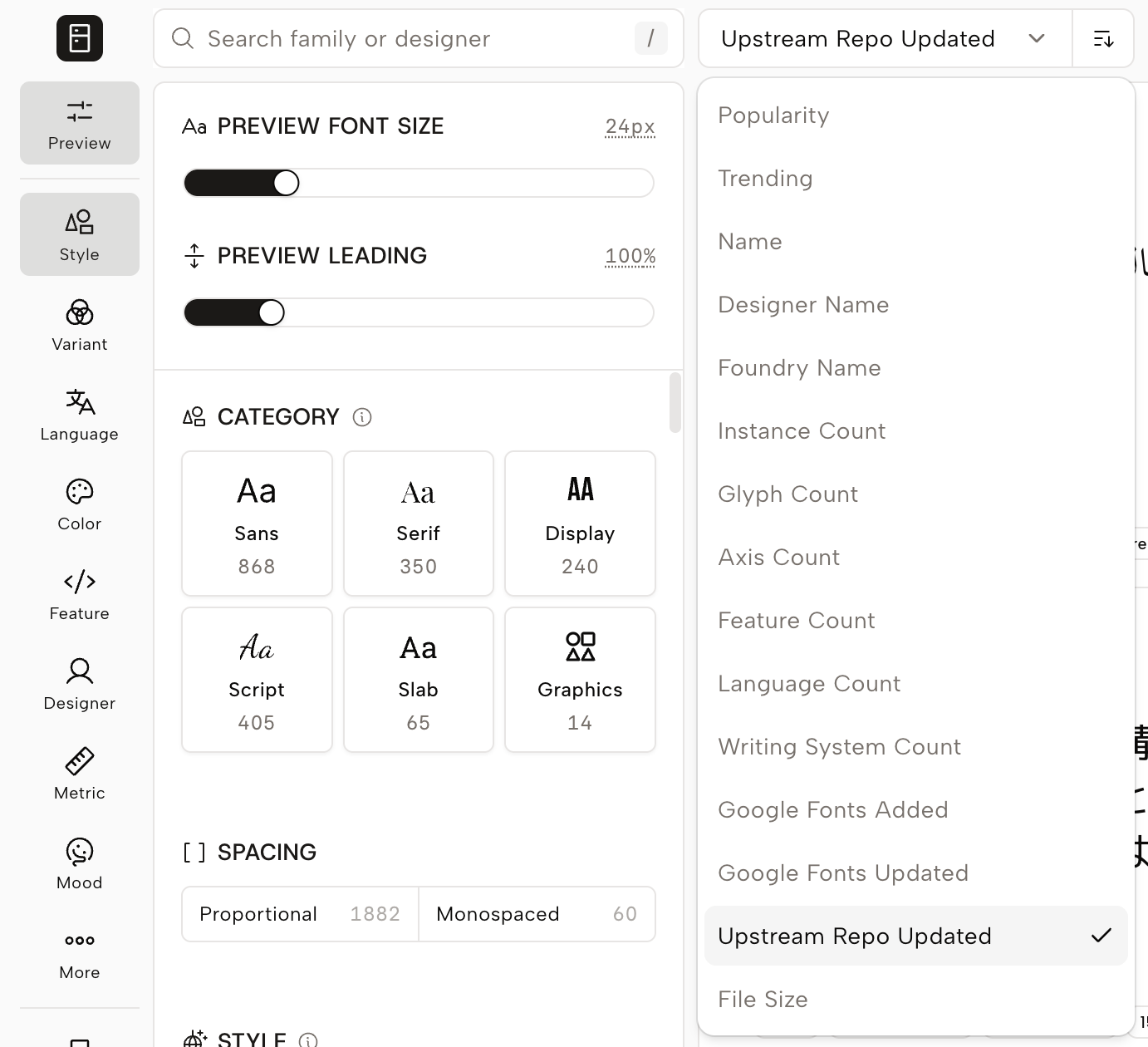 2
2 -
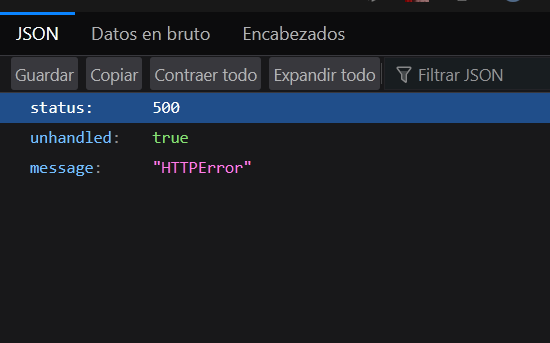
Nice! But now the website doesn't loads for me
 0
0 -
I just pushed several commits, the website might be under building at the moment.
It should be back to normal now.Cristóbal Alarcón said:Nice! But now the website doesn't loads for me0 -
This is really nice stuff. Chingru keeps making updates and tweaks, big and small, based on user feedback. Lovely to see! Thank you! 💚3



Categories
- All Categories
- 47 Introductions
- 4K Typeface Design
- 503 Type Design Critiques
- 594 Type Design Software
- 1.1K Type Design Technique & Theory
- 675 Type Business
- 910 Font Technology
- 29 Punchcutting
- 544 Typography
- 129 Type Education
- 333 Type History
- 82 Type Resources
- 114 Lettering and Calligraphy
- 33 Lettering Critiques
- 81 Lettering Technique & Theory
- 584 Announcements
- 101 Events
- 117 Job Postings
- 179 Type Releases
- 186 Miscellaneous News
- 270 About TypeDrawers
- 54 TypeDrawers Announcements
- 114 Suggestions and Bug Reports