TrueType hinting debugger


Comments
-
This has been extremely useful to me in finding and diagnosing bugs in my autohinter. Thank you!1
-
Simon, this tool was made for you ))I started it to check what's happening in Tilvisan hintingThen Adam extended it with "compare" feature, breakpoints, "jumps" and more.Let me know if we need to fix something or add any features, etc.0
-
The FontLab TTH Debugger is a browser-based debugger for TrueType hinting bytecode. If you’re a font engineer interested in TrueType hinting, this may be of interest to you. If “TrueType hinting” is not something that gets you excited — then you can probably ignore FontLab TTH Debugger.
Brief overview of FontLab TTH Debugger
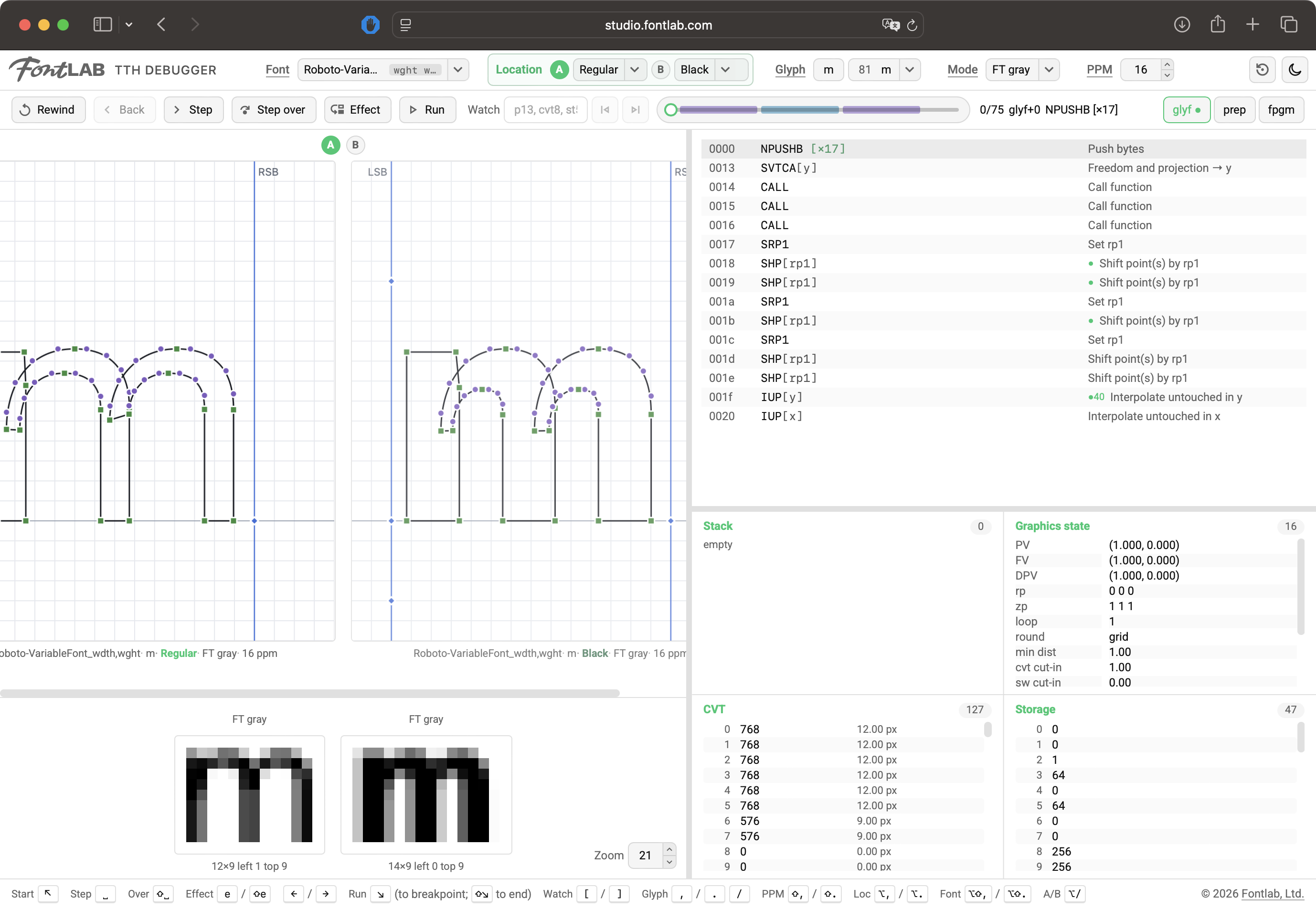
You drop a TTF on the page at studio.fontlab.com/tth-debugger, pick a glyph and a size, and the tool runs the font's own instructions at one ppem, one variation location and one render mode: the font program (
fpgm), which defines the functions, the control value program (prep), which runs once per size and location, and the selected glyph's program.After every instruction it records the state of the interpreter. Nothing you open leaves your machine: the scaler is FreeType compiled to WebAssembly and runs in the page, and every font you open is stored in the browser's IndexedDB, so your font list survives a reload.
You select a glyph by character,
U+code point, glyph name or index, set the size with the PPM control, and step. Step runs the highlighted instruction, Step over runs aCALLorLOOPCALLas one step and stops after it returns, Effect jumps to the next instruction that moves a point, and Run goes to the end of the program or to the next breakpoint, which you set by clicking an instruction's address in the listing. The tool replays a recording rather than a live interpreter, so stepping back is exact and the slider scrubs the whole program.The listing, stack, CVT, storage and graphics state panels all show the state as it is before the highlighted instruction, so the highlighted line is what happens next. If the font carries VTT source in its
TSI1table, the VTT toggle shows that source for the current range instead of the disassembly. The glyph view draws the outline over the pixel grid and colours the points the last instruction moved. If you need to know which instruction moved a point, click the point and press[or]: a watch expression (p13,x13,t2,cvt8,st5,stack,rp,zp,pv,round) jumps to the next step at which that value changes, which is the fastest way through a program of several thousand steps. Two columns, A and B, are always on screen, and you pick the one property along which they differ: Font, Location, Glyph, Mode or PPM. Column B inherits everything else from column A, so the two columns cannot drift apart on what they are supposed to share.The reference engine is FreeType 2.14.3 built to WebAssembly, with a C wrapper that hangs off
TT_ExecContext.instruction_trapand captures a snapshot after each instruction: stack, CVT, storage, graphics state, and the position of every point.fpgmandpreprun to completion, the glyph program is stepped, and the UI scrubs the recorded blob. The interpreter version follows the render mode, v35 for black-and-white and grayscale and v40 for RGB and BGR subpixel, and FreeType also rasterizes both columns, so the two bitmap previews are comparable.The second engine,
AP, is typftth, our Rust port of the opensource Apple TrueType interpreter (Swift rewrite of the old QuickDraw GX interpreter), which is compiled to WebAssembly. It emits the same snapshot format, so stepping, panels and captions work identically, and it runs under a FreeType-compatible host profile: it reports the sameGETINFOversion and flags as the FT mode it is paired with, and it tolerates out-of-range CVT indices the way FreeType does, so a font that gates hinting on the rasterizer version takes the same branch in both. The arithmetic stays Apple's: its scaling, its rounding, itsIPtruncation, its DELTA quirks.Around the WebAssembly sit a TypeScript disassembler (IP is a byte offset, immediates folded into the line), an
sfntreader for the glyph list and the unhinted outlines, and variation support that appliesgvarandcvardeltas before hinting runs, so you debug a variable font at the instance you select.The tool needs
glyfandloca: a CFF-flavoured OpenType font is rejected, because it carries no TrueType bytecode to step. Composite glyphs render in both engines, and AP steps the composite instructions it has, but FreeType's debug hook does not expose nested component programs as one stream, so FT shows a static hinted outline and bitmap for a composite. Recordings are kept whole, so a glyph with tens of thousands of steps costs load time and memory in proportion.The scope is hinting: no shaping, no kerning, no layout, one glyph at a time. On engine agreement,
scripts/diff-engines.mjshints every simple glyph in a folder with both engines and writestests/diff-report.md; on the internal variable-font corpus, 99.2 % of 9 028 glyph runs match within 1/64 px, and the rest differ throughIProunding, which Apple truncates and FreeType rounds. That difference stays in, because flattening it would hide the kind of divergence the two-engine view exists to show.4 -
We made the keyboard shortcuts of the FontLab TTH Debugger so that they’re familiar to users of FontLab 8:
,and.move to the previous and next glyph, same as in FontLab 8Shift+,andShift+.changes the PPM, same as in FontLab’s TrueType Hinting toolAlt+,andAlt+.walks between named instances of a variable font; in FontLab they walk between mastersShift+Alt+,andShift+Alt+.walks the loaded fonts/lets you type a glyph name to go to it, same as in FontLab 8Escapeleaves the text fieldAlt+/switches the view between A and B (primary and secondary Font, Location, Glyph, Mode or PPM); in FontLab 8 it switches between the basic and alternate view of the Glyph window
0


Categories
- All Categories
- 47 Introductions
- 4K Typeface Design
- 497 Type Design Critiques
- 591 Type Design Software
- 1.1K Type Design Technique & Theory
- 674 Type Business
- 907 Font Technology
- 29 Punchcutting
- 544 Typography
- 129 Type Education
- 333 Type History
- 82 Type Resources
- 114 Lettering and Calligraphy
- 33 Lettering Critiques
- 81 Lettering Technique & Theory
- 580 Announcements
- 101 Events
- 116 Job Postings
- 176 Type Releases
- 186 Miscellaneous News
- 270 About TypeDrawers
- 54 TypeDrawers Announcements
- 114 Suggestions and Bug Reports