additional ligatures do not show up – what might be wrong?

donat raetzo
Posts: 71
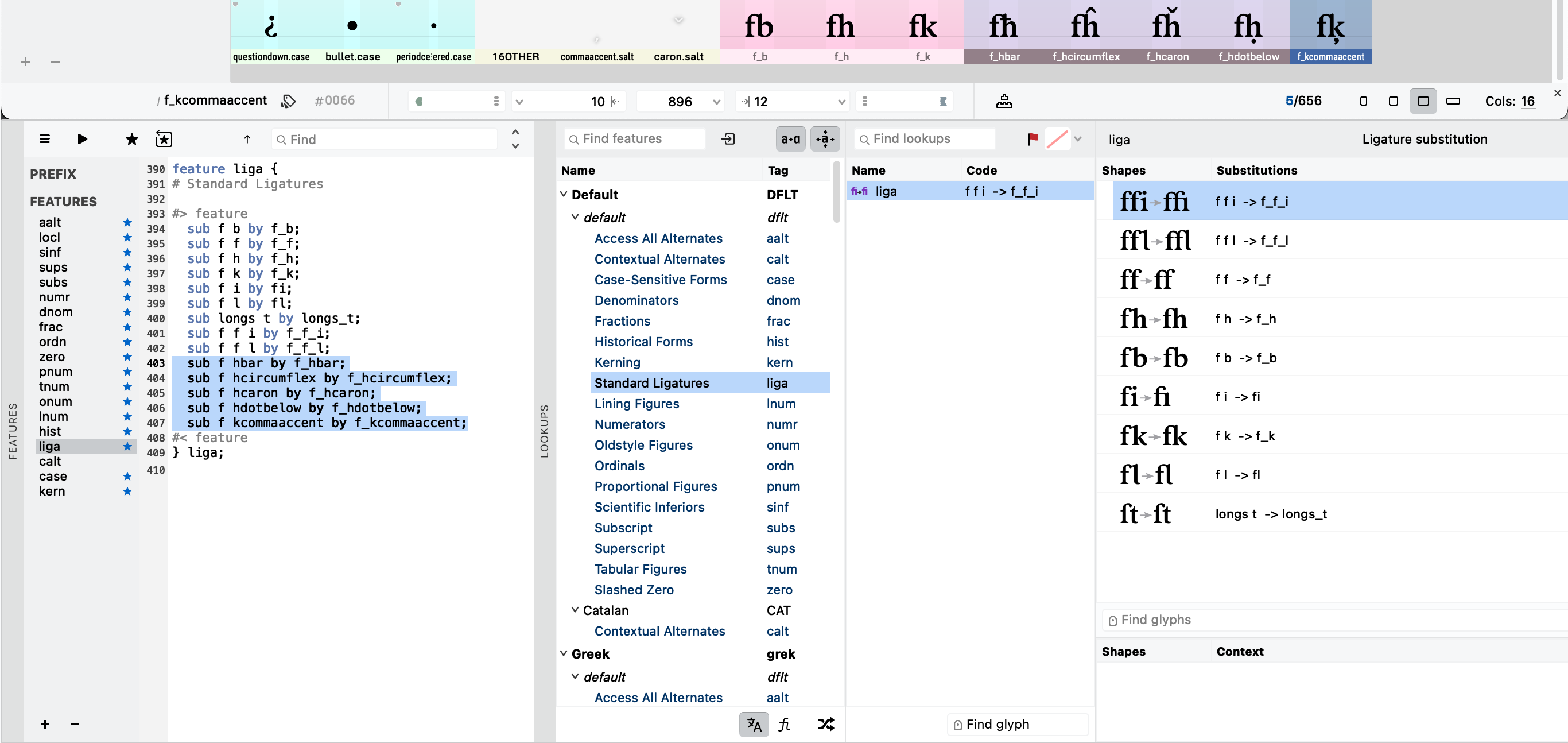
i added some ligatures (with accented glyphs) to my font and updated the features code, but those don't show up at all. neither in the lookup panel in my font editor nor in the test files in typo apps. what might be wrong with this? i am confused because the same process was okay for the previously made ligatures with non-accented glyphs.
0
Answers
-
Not sure why those five substitutions in particular are not working: the code looks fine.
A couple of comments though:
The order of substitutions matter, and for ligatures you generally want to go from longest to shortest input. So your f_f_i and f_f_l substitutions should come first, before the f_f substitution, otherwise the latter will be applied and those three-letter ligatures will never be activated.
The FontLab 8 Lookups panel is really cool, but doesn’t actually do anything. It was created as a partial implementation of a VOLT-like editing environment for OpenType Layout, but does not interact with the Features panel and does not (yet) have a compiler. So you should mostly ignore it for your purposes and just work with the code in the Features panel. Compile the code and then test your features in a Text window directly in FontLab. If it works there, then export a test font, ensuring that the font export profile has appropriate settings for writing the OTL features.
One last thought: if you have opened a compiled font in FontLab as a starting point for the feature code, the original GSUB table might have been saved in the background. There is a setting in Preferences to preserve some compiled tables when opening a font, so there is a chance that an existing GSUB table is not being overwritten with you new features code. You can open the Tables panel in FontLab to see what tables exist and delete any unwanted ones. [Save backup before deleting tables.]3 -
Thank you John for your comments! Hopefully i can solve the issue with re-ordering the feature code. The GSUB table is original (so to speak), not involving any other fonts GSUB table.John Hudson said:Not sure why those five substitutions in particular are not working: the code looks fine.
A couple of comments though:
The order of substitutions matter, and for ligatures you generally want to go from longest to shortest input. So your f_f_i and f_f_l substitutions should come first, before the f_f substitution, otherwise the latter will be applied and those three-letter ligatures will never be activated.
The FontLab 8 Lookups panel is really cool, but doesn’t actually do anything. It was created as a partial implementation of a VOLT-like editing environment for OpenType Layout, but does not interact with the Features panel and does not (yet) have a compiler. So you should mostly ignore it for your purposes and just work with the code in the Features panel. Compile the code and then test your features in a Text window directly in FontLab. If it works there, then export a test font, ensuring that the font export profile has appropriate settings for writing the OTL features.
One last thought: if you have opened a compiled font in FontLab as a starting point for the feature code, the original GSUB table might have been saved in the background. There is a setting in Preferences to preserve some compiled tables when opening a font, so there is a chance that an existing GSUB table is not being overwritten with you new features code. You can open the Tables panel in FontLab to see what tables exist and delete any unwanted ones. [Save backup before deleting tables.]0 -
... respectively, i can not find any GSUB table but only a GASP table. I never dealt with such tables.0
-
I did re-order ffi and ffl to the top of the feature code. I checked whether the substitutions work within Fontlab (text window, checked the fea-panel; they all show correct). The fonts i exported today work all well! For no obvious reason, maybe i had old data in the cache of my computer. Thank you for your help.0

Categories
- All Categories
- 47 Introductions
- 4K Typeface Design
- 501 Type Design Critiques
- 591 Type Design Software
- 1.1K Type Design Technique & Theory
- 675 Type Business
- 908 Font Technology
- 29 Punchcutting
- 544 Typography
- 129 Type Education
- 333 Type History
- 82 Type Resources
- 114 Lettering and Calligraphy
- 33 Lettering Critiques
- 81 Lettering Technique & Theory
- 580 Announcements
- 101 Events
- 116 Job Postings
- 176 Type Releases
- 186 Miscellaneous News
- 270 About TypeDrawers
- 54 TypeDrawers Announcements
- 114 Suggestions and Bug Reports