Vertical metrics standards

Tofu Type Foundry
Posts: 84
I have some naive questions. This article from the Glyphs team dives into the complex issue of vertical metrics; even after reading it numerous times I still don’t fully understand the intricacies. In the past I’ve gone with “the Google strategy” outlined in the article, since it appears to be a well-rounded solution.
What I’d like to know is: Do you use one of their recommended methods for setting hhea, typo, and win values? Is it necessary to use a different method because of the needs of the typeface? Does each foundry have a standard so all their fonts work well together in their own library?
What I’d like to know is: Do you use one of their recommended methods for setting hhea, typo, and win values? Is it necessary to use a different method because of the needs of the typeface? Does each foundry have a standard so all their fonts work well together in their own library?
0
Comments
-
Generally, “the needs of the typeface” only dictate a different strategy if there is something unusual about the typeface. The most common form this takes is in terms of language support, but it can be just design — such as a huge difference in cap height vs x-height.
This sort of info will tend to make its way into published guidance, though.
The most recent version of the Google guidance on this, with their special treatment for CJK borrowed from Adobe, is here: https://googlefonts.github.io/gf-guide/metrics.html
2 -
More or less, yes. The article is great for all the in-depth and historical context. The GF strategy can be summed up even shorter, and I'm glad it's the one that is also remotely memorable:- Use Typo Metrics- set win values on absolute font extrema- set typo/hhea to visually include important bits; forms default line height in relation to em- 0 typo/hhea line gap for consistency3
-
Thanks for linking to the Google Fonts Guide. I didn’t realize they created an index like that! The logic behind their decisions is exactly what I was hoping to learn more about, so this is perfect.Thomas Phinney said:Generally, “the needs of the typeface” only dictate a different strategy if there is something unusual about the typeface. The most common form this takes is in terms of language support, but it can be just design — such as a huge difference in cap height vs x-height.
This sort of info will tend to make its way into published guidance, though.
The most recent version of the Google guidance on this, with their special treatment for CJK borrowed from Adobe, is here: https://googlefonts.github.io/gf-guide/metrics.html0 -
2. Vertical metrics must be consistent across a family.
Each font in a family must share the same vertical metrics values.this strikes me as pretty aggressive. there are cases where, for example, the x-height changes sufficiently across an axis that you might want to introduce more vertical breathing room by default. worth noting Glyphs can’t handle this in variable fonts right now, you would have to add MVAR/VVAR afterward
1 -
It's all trade-offs. Without equalization across a family, if a paragraph of text has a bold word in the middle, the line heights would be inconsistent. Probably only subtly inconsistent; but if it's that subtle, when why not subtly increase the vertical space for all parts of the family and remove the inconsistency?jeremy tribby said:there are cases where, for example, the x-height changes sufficiently across an axis that you might want to introduce more vertical breathing room by default.0 -
right, yeah, weight would be a pretty unusual example. on the other side of the coin is something like an optical axis (and maybe a user who wants font-optical-sizing: auto) where I think it’s pretty reasonable if the weights are consistent at a given size
0 -
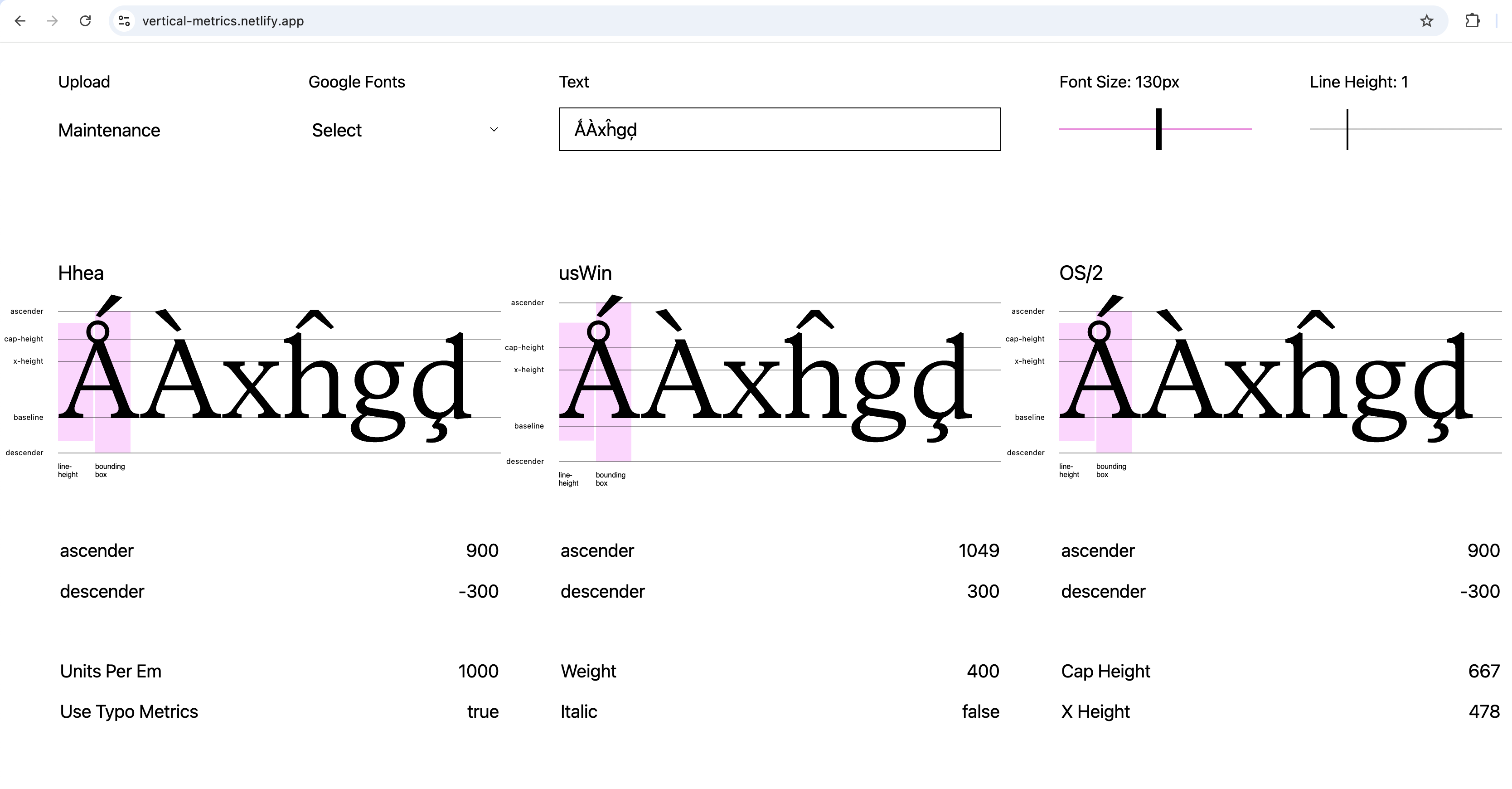
As an amateur I also strugle with the vertical metrics in my fonts. I picked up the „Ascender 900 / Descender 300 / Line Gap 0” approach for my font with 1000-UPM and implemented this.Though this screenshot of a test website shows a shift in baseline/x-height/capheight within the usWin settings compared to Hhea and OS/2.Is this a problem, that I need to fix (how?), or is this what it shoud be?
 0
0 -
All vertical measurements are from the baseline, so there is never actually a shift in glyph position relative to the baseline as shown in your illustration.
The two usWIN metrics values should properly define, at minimum, the total height of visible glyphs, and be used by software to define the zone outside of which shapes may be clipped in line layout. This is supposed to work independently of the linespacing metrics, but historically was misapplied in Microsft’s old GDI text engine and used to determine linespacing. This led to a long practice of font makers trying to set these usWin metrics to be equivalent to the sum of the usTypo and hhea metrics, or for the latter to be set to equivalent to the usWin metrics, which is what led to the LineGap value being set to zero, and the Ascender set to = usWinAscent and the Descender set to usWinDescent. It’s a mess.
In 2004, we introduced the fsSelection bit 7 setting in the OS/2 table to indicate to software that it should use the usTypo values for linespacing rather than the usWin metrics, which enabled a mechanism for software to get away from the GDI misuse of the latter while not breaking existing layout for older fonts. If this bit is turned on, as it now is in most fonts, then in theory the usWin metrics can be safely set as they are supposed to be, to define the non-clipping height. I do this in fonts with very tall ascending and descending glyphs, e.g. math fonts with growing delimiter variants. In typical Latin fonts, I try to maintain compatibility with the hhea and usTypo metrics, simply for legacy reasons and because my experience is that if software developers can find a way to get things wrong when it comes to font metrics, they will.
What I would do in your present situation is begin by confirming that you can fit your tallest and deepest glyphs within a total height of 1200 units, and that linespacing of 120% of text size is an appropriate default for your design (it isn’t always). Then I would set the usTypoAscender, hhea Ascender, and usWinAscent metrics to the same value, which should clear the top of the tallest glyph. Then I would measure downwards 1200 units (or whatever you decide should be the default baseline-to-baseeline spacing distance, and set that as the usTypoDescender, hhea Descender, and usWinDescent value. [Well, I say that is what I would do; I actually don’t like the LineGap = 0 model, and prefer to set my metrics as the specification reads rather than second-guessing how the latest software developer is going to get it wrong.]
As I say, that is what I would do, but I don’t know what software is most important to you or your clients/customers, and hence what might constitute ‘best practice’ for you. There was a time in the 2010s when it was briefly possible to define general best practices, but then new software came long with new assumptions. A few years ago, I got a lot of queries from font makers trying to figure out how to optimise vertical metrics settings for vertical alignment within buttons in Figma. I have been watching software makers get this stuff wrong for more than 30 years, so am disinclined to chase their tails.8 -
Thank you for your comments, @John_Hudson! So my uncertainty isn't without reason. Your experience comes with a touch of humor
 0
0 -
Being precise, that's not accurate, since GDI itself didn't have any APIs that did multi-line layout. However, it is true that GDI would report that height and things built on top of GDI that do multi-line layout would use that to determine linespacing.John Hudson said:... This is supposed to work independently of the linespacing metrics, but historically was misapplied in Microsft’s old GDI text engine and used to determine linespacing.2 -
Thanks, Peter, for the more precise explanation.0
-
It seems weird that the "Ascender" metric is "the highest thing in the font", rather than the actual height of ascenders.1
-
I'm glad you said that, John. It caught my eye, which bugged out a bit.John Hudson said:All vertical measurements are from the baseline, so there is never actually a shift in glyph position relative to the baseline as shown in your illustration.
I've been noticing that I cannot find anything that I deal with that actually pays any attention to the resulting line spacing based on a font's Vmetrics. Linespacing is being forcefully nailed to the CSS lineheight =xx EM not defaulting to lineheight = normal. That makes sense when web designers need to nail down a position, but all ebook (ePub) readers I checked forced the line spacing to some arbitrary value that in some cases was hard to imagine what it was based on (parsecs maybe) .
[Well, I say that is what I would do; I actually don’t like the LineGap = 0 model, and prefer to set my metrics as the specification reads rather than second-guessing how the latest software developer is going to get it wrong.]
..Todd0 -
There are also environments that by default apply a multiplier to the font metrics, so even when the linespacing is derived from the font metrics it might be something like e.g. 1.3× the height of the metrics.0
-
Stephen Nixon's TypeLab 2026 presentation titled 'Type Metrics' is currently available to watch on YouTube via this link. Please note that this link is temporary and may not work if you're trying to watch this weeks from now. Although I'm sure Stephen will probably publish a version of this on his YT channel at some point.2





Categories
- All Categories
- 47 Introductions
- 4K Typeface Design
- 497 Type Design Critiques
- 591 Type Design Software
- 1.1K Type Design Technique & Theory
- 674 Type Business
- 906 Font Technology
- 29 Punchcutting
- 543 Typography
- 128 Type Education
- 333 Type History
- 82 Type Resources
- 114 Lettering and Calligraphy
- 33 Lettering Critiques
- 81 Lettering Technique & Theory
- 579 Announcements
- 101 Events
- 116 Job Postings
- 175 Type Releases
- 186 Miscellaneous News
- 270 About TypeDrawers
- 54 TypeDrawers Announcements
- 114 Suggestions and Bug Reports