Variation Sequence Characters in a font?

Answers
-
Variation selector sequences are not handled in OTL. Technically, they could have been, via the ccmp feature for example, but Microsoft [260201 correction: Adobe proposed this; see @Peter Constable response below] wanted a solution for Unicode variation selectors that wasn’t dependent on glyph processing and shaping engines. So variation selectors are handled via a format 14 cmap subtable. This is like other cmap formats in that it maps from Unicode characters to glyph IDs, but in a format 14 format a sequence of two Unicode characters map to a single GID; the first character is the input character and the second is the variation selector character.
This is what the format 14 subtable in STIX Two Math looks like in DTL OTMaster. Because common font tools don’t provide direct support for format 14 cmap, I hand build them in OTMaster, and then my build configuration file copies the cmap into each build of the font.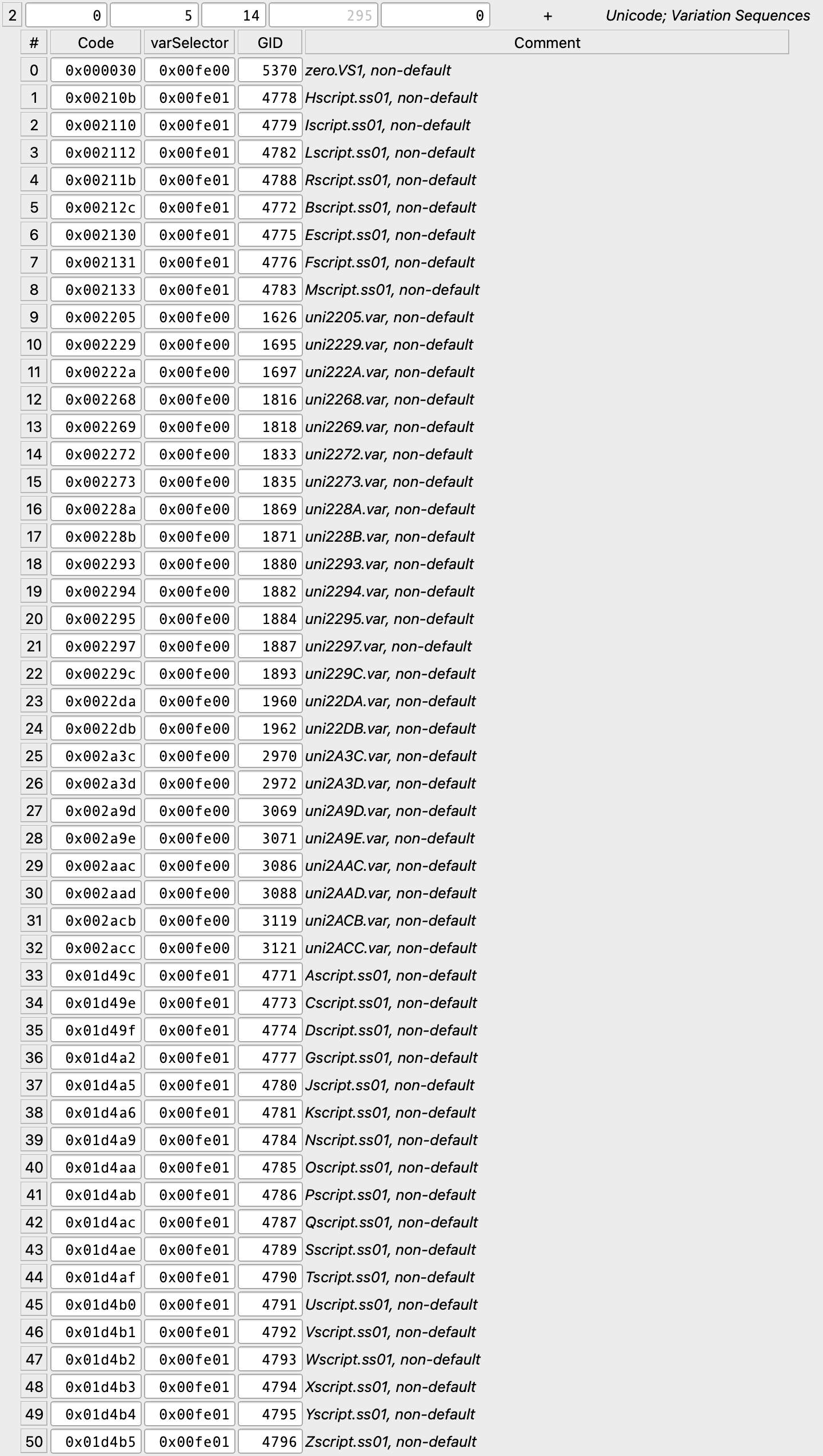
4 -
FontCreator can view and edit Unicode Variation Sequences, and it will generate the required cmap format 14 data on export. Note that this functionality is currently only available in the Windows edition (macOS doesn’t have this part yet).
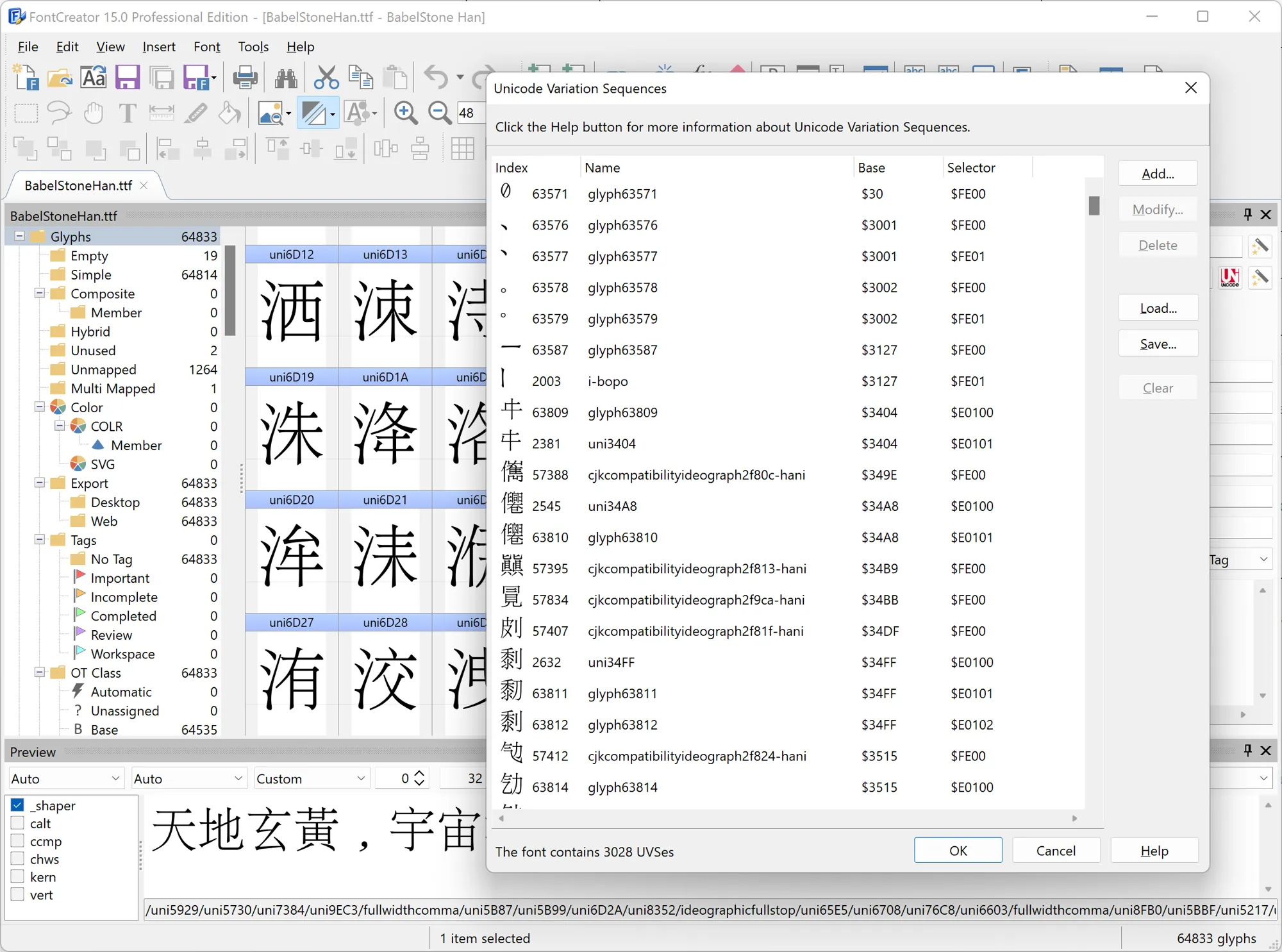
Workflow in FontCreator (Windows) is basically:
- Create/import the variant glyph (your alternate design).
- Add an entry in the Unicode Variation Sequences editor that maps (base codepoint + VS codepoint) to that glyph.
- Export the font.
3 -
thank you, John and Erwin.I would like to have a more straightforward method which works in Fontlab on the Mac, possibly without the need of extra application(s). Is there any such option?0
-
I’m not aware of any option to create a format 14 cmap subtable from within FontLab.
I can imagine a way in which it could be implemented via a syntax extension in the FL glyph properties panel. I’ll raise it with Adam and Yuri.
0 -
Now also wondering if there is a way to capture variation selector sequences in UFO?0
-
Yes, UFO 3 has a standard way to store Unicode Variation Sequences.John Hudson said:Now also wondering if there is a way to capture variation selector sequences in UFO?
Put them in lib.plist under the key public.unicodeVariationSequences. Spec link:
https://unifiedfontobject.org/versions/ufo3/lib.plist/#publicunicodevariationsequences
2 -
Actually, it was Adobe that proposed handling variation sequences with a new cmap subtable.John Hudson said:... but Microsoft wanted a solution for Unicode variation selectors that wasn’t dependent on glyph processing and shaping engines. So variation selectors are handled via a format 14 cmap subtable.2 -
Quick update: FontCreator for macOS now also supports Unicode Variation Sequences (UVS). We’ve just released an update that lets you view and edit UVS, and it exports the required cmap format 14 data.
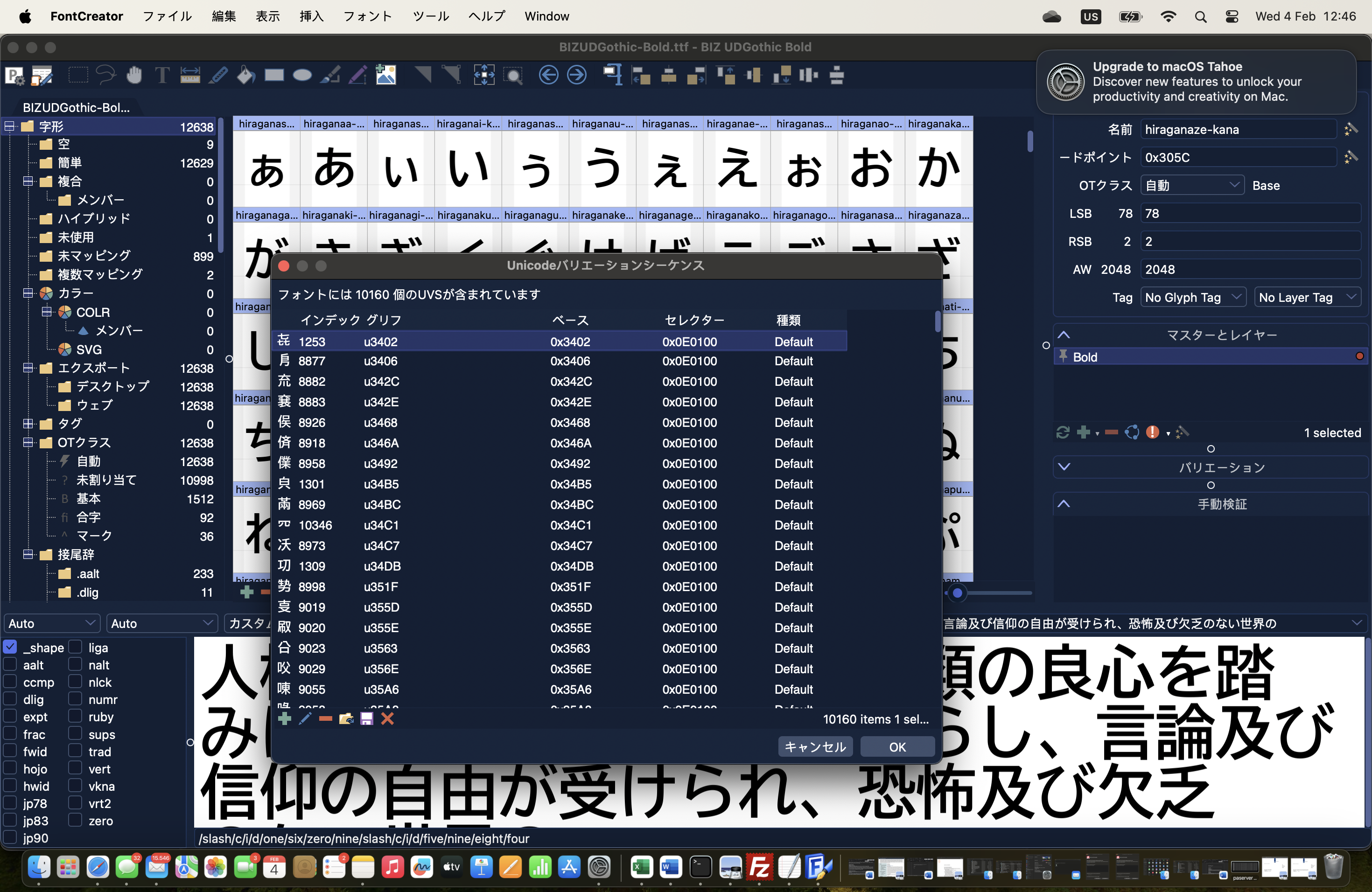
So if you’re working with UVS, you can now manage them in both the Windows and macOS editions of FontCreator.
Visit our website for more information about our font editor and a fully functional trial:
https://www.high-logic.com/font-editor/fontcreator
1 -
thank you Erwin, that really sounds like a plan.– just for my understanding, please correct me:1. I import a .VFB master file2. I edit the cmap 14 table (and possibly other things)3. I generate the font out of FontCreator?
0 -
FontCreator can’t import FontLab .VFB files directly.
What you can do is export the FontLab project to one of the formats FontCreator supports, then edit/add UVS (cmap format 14) and export your final font from FontCreator.
FontCreator can open and save these project formats:- FontCreator Project
- Unified Font Object (UFO)
- Designspace (mainly for variable fonts)
- Glyphs file format
More info (supported project formats / workflow):
https://www.high-logic.com/fontcreator/manual15/workingwithfontprojects.html0 -
Glyphs does support variation selectors by adding a ".uvXXX" suffix to the glyph name. The XXX is the index of the vs (a.uv001 would give you 0xFE00).0
-
Is it done by just adding this kind of suffix to the glyph name? I mean, I can do this easily in FL or any other program, manually. I thought the crucial bit was the ominous cmap-14 table which is needed inside the font in order to enable the VS functionality. – What info am I missing?Georg Seifert said:Glyphs does support variation selectors by adding a ".uvXXX" suffix to the glyph name. The XXX is the index of the vs (a.uv001 would give you 0xFE00).0 -
What info am I missing?
Georg is describing the mechanism used internally by Glyphs to indicate that a glyph should be written as a variation selector sequence to a format 14 cmap subtable.
So to recap, you currently have three options documented in this thread:
1. Use a post-production tool (e.g. DTL OTMaster or TTX) to manually insert a format 14 subtable into the font generated from your FontLab source.
2. Export a UFO file from your FontLab source and open it in FontCreator. Create the format 14 subtable entries within FontCreator and export the font.
3. Export a .glyphs file from your FontLab source and open it in Glyphs. Use the Glyphs naming convention (which you could do upstream in your FontLab source) for variation selector sequence target glyphs, and export your font from Glyphs.
And another option would be:
4. Manually code a public.unicodeVariationSequences lib.plist entry and insert it into a UFO exported from FontLab, then use an external build process (e.g. the Tiro Builder) to generate the font from the UFO.
I sent a feature request to FontLab to natively support variation selector sequences, and suggested an easy way to do it within the FL Glyph info panel, but they’re late in a development cycle, I think, so I don’t know how likely this is to get implemented soon.
0 -
This being Yuri, it is totally possible he would squeeze it in. Very much in character.1
-
thanks John.such an implementation in FL would be most welcome.0
-
"If I'm not mistaken, for FontLab you have to define this manually in the Tables panel. FL doesn't automatically generate cmap format 14 just by naming the glyphs.
Here is the syntax to test with:
table cmap {
subtable format 14
{ def uvs 0x2229 0xFE00 <uni2229.var>; }
} cmap;
1 -
Thanks, Tural. That is really interesting.
I’ve only ever used the Tables panel to delete tables, and wasn’t really aware that one could edit table content within it. Were you able to confirm that definining a format 15 subtable in this way is additive, i.e. it will add it to the subtables automatically written by FontLab? Or do you need to define all the subtable entries in the Tables panel if taking this approach?0 -
Thanks, John. You were right to be skeptical, but it was too good to be true (i.e. it didn't work).I tried to test the code I shared, but the Tables panel gave a syntax error (mismatched tag). It seems that the parser in FontLab doesn't support subtable format 14 or def uvs inside a table cmap block.Since the code didn't compile at all, it wasn't even possible to check whether it was adding (to other tables) or deleting them.1
-
I checked the syntax of cmap 14 table in StixTwoMath with ttx and it was like
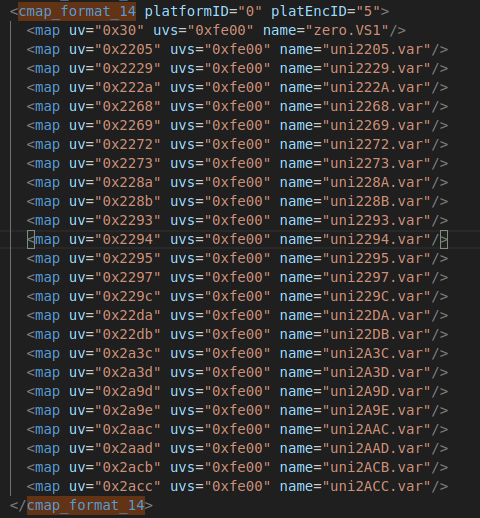
May be proper ttx syntax will help ?1


Categories
- All Categories
- 46 Introductions
- 3.9K Typeface Design
- 489 Type Design Critiques
- 572 Type Design Software
- 1.1K Type Design Technique & Theory
- 658 Type Business
- 870 Font Technology
- 29 Punchcutting
- 528 Typography
- 121 Type Education
- 327 Type History
- 80 Type Resources
- 111 Lettering and Calligraphy
- 32 Lettering Critiques
- 79 Lettering Technique & Theory
- 560 Announcements
- 95 Events
- 116 Job Postings
- 169 Type Releases
- 179 Miscellaneous News
- 269 About TypeDrawers
- 53 TypeDrawers Announcements
- 114 Suggestions and Bug Reports